How java become a independent language?

How is Java platform independent?

Tech Jitendra provide

The meaning of platform independent is that, the java source code can run on all operating systems.
A program is written in a language which is a human readable language. It may contain words, phrases etc which the machine does not understand. For the source code to be understood by the machine, it needs to be in a language understood by machines, typically a machine-level language. So, here comes the role of a compiler. The compiler converts the high-level language (human language) into a format understood by the machines. Therefore, a compiler is a program that translates the source code for another program from a programming language into executable code.
This executable code may be a sequence of machine instructions that can be executed by the CPU directly, or it may be an intermediate representation that is interpreted by a virtual machine. This intermediate representation in Java is the Java Byte Code.

Step by step Execution of Java Program:

  • Whenever, a program is written in JAVA, the javac compiles it.
  • The result of the JAVA compiler is the .class file or the bytecodeand not the machine native code (unlike C compiler).
  • The bytecode generated is a non-executable code and needs an interpreter to execute on a machine. This interpreter is the JVM and thus the Bytecode is executed by the JVM.
  • And finally program runs to give the desired output.
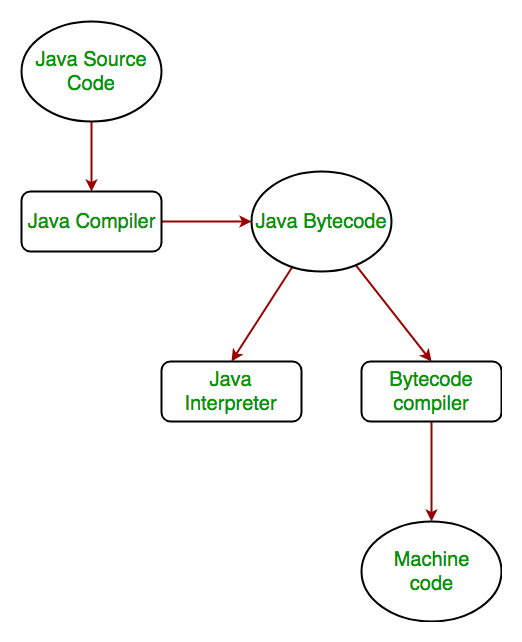
.
In case of C or C++ (language that are not platform independent), the compiler generates an .exe file which is OS dependent. When we try to run this .exe file on another OS it does not run, since it is OS dependent and hence is not compatible with the other OS.

Java is platform independent but JVM is platform dependent

In Java, the main point here is that the JVM depends on the operating system – so if you are running Mac OS X you will have a different JVM than if you are running Windows or some other operating system. This fact can be verified by trying to download the JVM for your particular machine – when trying to download it, you will given a list of JVM’s corresponding to different operating systems, and you will obviously pick whichever JVM is targeted for the operating system that you are running. So we can conclude that JVM is platform dependent and it is the reason why Java is able to become “Platform Independent”.
Important Points:

  • In the case of Java, it is the magic of Bytecode that makes it platform independent.
  • This adds to an important feature in the JAVA language termed as portability. Every system has its own JVM which gets installed automatically when the jdk software is installed. For every operating system separate JVM is available which is capable to read the .class file or byte code.
  • An important point to be noted is that while JAVA is platform-independent language, the JVM is platform-dependent.Different JVM is designed for different OS and byte code is able to run on different OS.

Thanking you

Team ,

Tech Jitendra

Tech Jitendra
• Tags

• Development

• Java
Java
Definition – What does Java mean?
Java is a programming language that produces software for multiple platforms. When a programmer writes a Java application, the compiled code (known as bytecode) runs on most operating systems (OS), including Windows, Linux and Mac OS. Java derives much of its syntax from the C and C++ programming languages.

Java was developed in the mid-1990s by James A. Gosling, a former computer scientist with Sun Microsystems.

Tech Jitendra explains Java
Java produces applets (browser-run programs), which facilitate graphical user interface (GUI) and object interaction by Internet users. Prior to Java applets, Web pages were typically static and non-interactive. Java applets have diminished in popularity with the release of competing products, such as Adobe Flash and Microsoft Silverlight.

Java applets run in a Web browser with Java Virtual Machine (JVM), which translates Java bytecode into native processor instructions and allows indirect OS or platform program execution. JVM provides the majority of components needed to run bytecode, which is usually smaller than executable programs written through other programming languages. Bytecode cannot run if a system lacks required JVM.

Java program development requires a Java software development kit (SDK) that typically includes a compiler, interpreter, documentation generator and other tools used to produce a complete application.

Development time may be accelerated through the use of integrated development environments (IDE) – such as JBuilder, Netbeans, Eclipse or JCreator. IDEs facilitate the development of GUIs, which include buttons, text boxes, panels, frames, scrollbars and other objects via drag-and-drop and point-and-click actions.

Java programs are found in desktops, servers, mobile devices, smart cards and Blu-ray Discs (BD).
Share this:

Related Terms
• Java Virtual Machine (JVM)
• Java Development Kit (JDK)
• Java Applet
• Java Database Connectivity (JDBC)
• Java Bytecode
• Java Archive (JAR)
• Annotation
• Embedded Java
• Javadoc
• Java Authentication and Authorization Service (JAAS)
!

What Java means?
Java is a high-level programming language developed by Sun Microsystems. … Instead,Java programs are interpreted by the JavaVirtual Machine, or JVM, which runs on multiple platforms. This means all Javaprograms are multiplatform and can run on different platforms, including Macintosh, Windows, and Unix computers.

What are the basics of Java?
Java – Basic Syntax
• Object − Objects have states and behaviors. …
• Class − A class can be defined as a template/blueprint that describes the behavior/state that the object of its type supports.
• Methods − A method is basically a behavior. …
• Instance Variables − Each object has its unique set of instance variables.

What is the full form of Java?
Java does not have any full form, but a programming language originally developed by James Gosling at Sun Microsystems in 1995. It derives much of its syntax from the most popular programming languages of all time : C and C++. Today Java of Sun Microsystems is a subsidiary of Oracle Corporation.Mar 7, 2019
What is the full form of Java?
Java does not have any full form, but a programming language originally developed by James Gosling at Sun Microsystems in 1995. It derives much of its syntax from the most popular programming languages of all time : C and C++. Today Java of Sun Microsystems is a subsidiary of Oracle Corporation.Mar 7, 2019

Must read

Thanking you

Team ,

Tech jitendra .

जीमेल का नया ‘डायनैमिक ईमेल’ फीचर

हाल ही में गूगल ने जीमेल यूजर के लिए “डायनैमिक इमेल” फीचर लाने की घोषणा की। कुछ खास यूजर इस फीचर के डेस्कटॉप वर्जन का पहले से ही लाभ उठा २हे है। इस फीचर के आने से यूजर अब एक ही टैब में मैसेजिंग कर पायेंगे । उन्हे बार बार टैब बदलने की आवश्यकता नहीं पड़ेगी ।

● डायनैमिक ईमेल के जरिये यूजर अपडेट रहेंगे। इस फीचर से युजर काफी अच्छे से एक ही इमेल में बात / मैसेज कर पायेंगे । ये मैसेज किसी इवेंट के लीए आरएसवीपी हो सकते है, किसी फार्म के रूप में हो सकते है , कैटलॉग ब्राउजिंग के लिए , या फिर किसी कमेंट के जवाब के रुप में हो सकते है । यदि आपको यह फीचर इतना उपयोगी न लगे तो आप इसे गूगल एडमिन के जरिए डिसेबल भी कर सकते है ।

● इस फीचर के जरिए यूजर किसी साइट को भी ब्राउज कर सकते है, और एक ही क्लिक से सारी जानकारी इमेल टैब पर ही पा सकते है । इसके लिए आपको दूसरा टैब खोलने की जरूरत नहीं पड़ेगी ।

डायनैमिक ईमेल के जरिए आप कोई भी बिजनेस संचालित कर सकते है । किसी बुकिंग साइट का इस्तेमाल कर सकते है। आप डायनैमिक ईमेल को अपने पर्सनल अकाऊंट के लिए हेल्प सेन्टर से टर्न आफ की कर सकते है , पर ऐसा करने के लिए सुनिशिचत कर ले कि डिस्पले एक्सटर्नल इमेजिस सेटिंगस डायनैमिक के लिए इनेबल्ड हो ।

Thanking you

Tech Jitendra

रीसाइकल एप भी बड़ी काम की होती है ।

इंड्रॉयड डिवाइस के लिए कुछ रीसाइकल एप ऐसे हैं, जो आपके लिए काम के हो सकते है।

यदि आप गलती से भी अपना डेटा डिलीट नहीं करना चाहते और उसे सुरक्षित रखना चाहते हैं तो आपको अपने इंड्रॉयड डिवाइस के लिए किसी रिसाइकल एप का उपयोग करना चाहिए , जो आसानी से गूगल प्ले स्टोर पर मिल जाते है । दुनियाभर में करोड़ों यूजर एंड्रॉयड डिवाइस इस्तेमाल करते हैं यह लाइनेक्स ऑपरेटिंग सिस्टम पर आधारित है । इस प्लेटफॉर्म पर कई तरह के ऐप का इस्तेमाल किया जा सकता है । इंड्रॉयड रीसाइकल बीन एप से हम अपनी गलती से डिलीट की हुई फाइल को दोबारा पा सकते है ।

आइए जानते हैं, ये कौन – कौन से एप हैं –

डंपस्टर : यह एक बढ़िया एप है, क्योंकि यह उन सभी चीजों को सेव करता है जो आपके इंटरनल स्टोरेज से गलती से डिलीट हो जाती हैं। इसे किसी भी प्रकार के रूट एक्सेस की जरूरत नहीं होती । यह एंड्रॉयड स्मार्टफोन पर अच्छे से काम करता है ।

डिस्कडिगर: यह रूटेड या नॉन – रूटेड दोनों तरह के स्मार्टफोन पर एक्सेस किया जा सकता है । यदि आप रुटेड डिवाइस पर काम कर रहे हैं तो यह आपकी सभी डिलीट की गई फाईल को सेव करता है । यह क्लाउड स्टोरेज सर्विस भी प्रदान करता है ।

रीसाइकल मास्टर : यदि आप अपने स्मार्टफोन से कुछ भी डिलीट करते हैं तो यह उन सब का बैकअप रख लेता है । वैसे तो यह डंपस्टर की तरह ही है, पर इसका इंटरफेस काफी साफ है। यह एक काफी स्पष्ट और सुनियोजित है ।

सीएक्स फाइल एक्सप्लोरर : यह आपके एंड्रॉयड स्मार्टफोन के लिए संपूर्ण एप है, जिसमें आपको इन-बिल्ट रीसाइकल बिन मिल जाता है । यदि आप इस एप के जरिये कोइ भी फाइल डिलीट करते हैं तो वह अपने आप रीसाइकल बीन में सुरक्षित हो जाती है । इसके जरिये आप उन फाइल को रीस्टोर कर सकते है, जो आपसे गलती से डिलीट हो गई हैं ।

Plz …. Read my article and follow and share everyone .

Thaking you

Tech Jitendra

ब्राउजर से न हो जाए डेटा चोरी !

गूगल का सबसे ज्यादा इस्तेमाल होने वाला वेब ब्राऊजर है , क्रोम । यह इंड्रायड के लिए काफी सहायक है । ससके कई फीचर्स है और आप रोज इससे अपनी जरूरत मुताबिक फायदा उठा सकते हैं । यहाँ काफी लोगो का निजी डाटा होता है , इस लिए गूगल सुरक्षा को ले कर काफी सतर्कता बरतता है । इसका प्रसिद्ध सिक्योरिटी फीचर है, पैडलॉक , जो हमे यह जानकारी देता है कि ब्राउजर सुरक्षित है या नहीं। पर हम सभी ये जानते है कि इतना होने के बाद भी हमारा डेटा पूरी तरह सु२क्षित नहीं है , इसलिए हमें इस बात की जानकारी है कि हम किस तरह ये पता ल्गा सकते हैं कि ब्राऊजिंग के दौरान कोई वेबसाइट हमारा डेटा चुराने की कोशिश तो नहीं कर रही है ! आइए जानते है कि इसके लिए क्या क्या चिज किया जाना चाहिए ——

● यदि आप क्रोम पर कोई टैब्स खोल कर ब्राउजिंग कर रहे है तो ध्यान रखें कि आपकी टास्क बार में कितने खुले टैब्स नजर आ रहे है । गलत टास्क बार हमेशा गलत ही संख्या दिखाएगी ।

●जाली पेज सही यूजर इंटरफेस न्हीं दिखाता। तब आप अपना फोन लॉक कर के देखेंगे । अब आप फोन अनलॉक करेंगे तो आपको जाली पेज का वास्तविक यूजर इंटरफेस नजर आएगा । यदि वेब पेज एक जाल हे, तो आपको दो टास्क बार नजर आऐंगे।

●इंड्रायड के लिए गूगल क्रोम के पास एक डार्क थीम है। इसे आप कभी भी एक्टिवेट कर सकते है , काले रंग में ब्राउजर सहीं चीजे ही दिखाएगा और जाली नज२ नहीं आऐंगे।

●गलतियों का सुधार किया जा सकता है , पर यह आपके लिए नुकसानदायक हो सकता है । इसलिए उचित तो यहीं होगा कि आप ब्राउजिंग करते समय थोड़ा चौकन्ने रहें। किसी भी वेबसाइट को खोल्ते समय सतर्क रहना जरूरी है ।

Thanking you ….

Tech Jitendra

जानें गूगल मैप्स अपडेट क्या है ?

अब आप गूगल मैप्स पर ट्रैन का स्टेटस, बस का समय और कई जानकारी देख सकते है ।

ऐसा पहली बार नहीं हुआ है कि गूगल ने विशेषतः भारत के लिए अपने मैप्स में फीचर्स जोड़े हैं। हाल में गूगल मैप में तीन नए फीचर्स जोड़े गए हैं ताकि भारतीय यूजर्स सार्वजनिक परिवहन पर भरोसा कर सके । ये फीचर्स इंड्रॉयड एप के लिए ही बनाए गए है ।

गूगल मैप्स का रीयल टाईम बस ट्रैवल टाईम :- ये वो सवसे पहला फीचर्स है , जो गूगल मैप्स यूजर के लिए लाया है | इसमें आपको पता चल जाएगा की किसी भी बस से आपको एक स्थान से दुसरे स्थान पर जाने के लिए कितना समय लगेगा । अपको दी जाने वाली सूचना आपके बताए गए रूट पर लाइव ट्राफिक स्टेटस के आधार पर दी जाती है। बस के देरी से आने की स्थिति में आपको लाल बॉक्स में कारण के साथ अनुमति विलंब की जानकारी भी दी जाएगी और यदि बस समय पर हो तो हरे बॉक्स में समय नजर आता रहेगा| शुरुआती दौर में यह फीचर कुछ चुनिंदा सहारो जैसे बंगलुरु दिल्ली चेन्नई हैदराबाद लखनऊ मैसूर पुणे सूरत पटना में उपलब्ध होगा।

लाइव ट्रेन स्टेटस ऑन गूगल मैप :-

फिचर भी बस सेवा की तरह ट्रेन के लिए बनाया गया है । इसमें आपको ट्रेन का वास्तविक समय पता चल जाएगा , यदि ट्रेन अपने निर्धारित समय से देरी से चल रही हो तो वह भी सटीक तौर पर बता दिया जाएगा , 1 बात जरूरी है कि यह फीचर केवल लंबी दूरी की ट्रेनों के लिए ही काम करेगा।

मिक्स मोड नेविगेशन फीचर :-

कंपनी के इस फीचर में user को kab ऑटो रिक्शा लेना चाहिए इसकी सलाह दी जाती है इतना ही नहीं आपको वो स्टेशन या स्टॉप के विषय में भी सुझाव दिया जाता है जहां से आपको मेट्रो याद बस बदलना हो इस फीचर के तहत गूगल मैप्स मैप्स गूगल मैप आपको किराया और दोनों की जानकारी उपलब्द कराता है ।

Thanking you

Tech Jitendra

नेविगेशनल कीज को करें रूट

पुराने स्मार्टफोन की खराब हुई नेविगेशनल कीज से पैदा हुई समस्या का समाधान है। आइए जाने कैसे ——

इंड्रॉयड हैंडसेट की स्क्रीन पर नीचे की ओर तीन छाटे-छोटे बटन नजर आते हैं, जिनसे आप आगे-पीछे या होम स्क्रीन पर वापस लौट सकते है, ये कई फोन में उपलब्ध नहीं होते है। यदि आपको अपने फोन में ये बटन चाहिए तो ऑनलाइन उपलब्ध सभी तरीकों में आपकों अपनी डिवाइस को रूट करना पड़ता है । लेकिन अब आप कुछ एप की मदद से इन को आसानी से अपने फोन में जोड़ सकते है ।

बैक बटन (नो रूट) :- इस एप को लॉन्च करने पर एक मैसेज पॉप अप होगा जिसमें फोन एक्सेस करने की परामिसन देने के बाद एक्टिव बटन पर क्लिक कर एप को एक्टिवेट कर लें और स्क्रीन पर जो बटन आपको चाहिए , उन्हे चुन लें।

यूजिंग सिंपल कंट्रोल:- इस एप में भी आपको परमिशन देनी होगी । इसके बाद सेटिंग पर जाकर प्राथमिकता के आधार पर विकल्प चुन लें । इसके बाद आप अच्छे से आइकन देख लें और स्क्रीन पर जो भी आपको चाहिए उन्हें चुन लें।

सॉफ्ट कीज2 :- परमिशन देने के बाद सेटिंग में जाकर कीज की चौड़ाई , लंबाई और पारदर्शिता को इच्छानुसार सेट कर ले । अब होम बटन दबाएं, आपको अपनी स्क्रीन पर सॉफ्ट बटन नजर आने लगेंगे।

नेविगेशन बार:- यह भी अपने फोन पर नेविगेशन बटन जोड़ने का काम एक विकल्प है । इस पर की एक विशेषता , जो इसे बांकी सबसे अलग करती है वह है, कस्टमाइजेशन के विकल्पों की बहुलता । इसमें आप नेविगेशन बार के रंगों को भी सेट कर सकते हैं।

असिस्टिव टच :- यह एप आपको स्क्रीन पर ही फ्लोंटिंग पैनल पर कोई विकल्प देता है जैसे- ब्राइटनेस एडजस्ट करना , स्क्रीनशॉट लेना आदि । आप डिफॉल्ट नेविगेशन बार को रिप्लेस करने के लिए होम बटन और बैक बटन को भी इस फ्लोटिंग पैनल में रख सकते है ।

Plz … Read ,like , share and comment

Thanking you —-

Tech Jitendra

वॉट्सएप स्टेटस भी कर सकते है सेव ।

किसी के स्टेटस को सेव करने के लिए पहले आपको स्क्रीनशॉट लेना पड़ता था , लेकिन अब आप बिना स्क्रीन शॉट लिए ही सेव कर सकते है

No third party application required to save or download or copy whatsapp status .

हम सभी को वाट्सएप स्टेटस फीचर काफी पसंद आया था । लिंक से ले कर विडियो तक या सवालों जैसी कोई अन्य पोस्ट डालनी हो तो इस फीचर की जो बात खलती है , वह यह है कि “इसमें अन्य युजर के स्टेटस को आसानी से सेव नहीं किया जा सकता “।

किसी स्टेटस को सेव करने करने के लिए पहले आप उसका स्क्रीनशॉट लेते है और फिर उस इमेज को क्रोप करते है । लेकिन मैं जो टेकनिक बताने जा रहा हूँ , इस टेकनिक की सबसे खासियत यह है कि _ आपको किसी थर्ड-पार्टी एप की जरूरत नहीं पड़ती स्टेटस को सेव करने के लिए । आपको अपने फाइल मैनेजर को तब तक सर्च करना होगा जब तक आपको अपनी फाइल न मिल जाए –

● सबसे पहले अपने android phone पर फाइल मैनेजर ओपन करे ।

● फिर phone के internal storage पर जाए और सेटिंग पर क्लीक करे ।

● इस मेन्यू में जाकर ‘शो हाईडन फाइल्स’ का विकल्प चुने।

● अब आप वॉट्सएप फोल्डर सर्च करे ।

● इस फोल्डर के तहत आपके “स्टेटसिज” नाम की फाइल मिलेगी ।

● जितने भी स्टेटस आपने देखे है वे सभी आपको यहीं मिल जाएगा ।

● यहाँ से जो भी इमेज या मीडिया फाइल आपको चाहिए उसे कांपी कर दूसरी लोकेशन पर भेज दें ।

● यहाँ एक बात और स्पष्ट करना चाहुँगा कि – आपको इसमें सिर्फ वही स्टेटस फाइल मिलेंगी जो अभी तक यूजर के स्टेटस पर मौजूद है । इसलिए अगर आपको कोई स्टेटस अपने पास सुरक्षित रखना हो तो उसके disappeare होने से पहले ही आपको उसे |कॉपी कर लेना होगा ।

धन्यवाद ।

Design a site like this with WordPress.com
Get started