There are many differences and similarities between the C++ programming language and Java.
A list of top differences between C++ and Java are given below:
Comparison IndexC++JavaPlatform-independentC++ is platform-dependent.Java is platform-independent.Mainly used forC++ is mainly used for system programming.Java is mainly used for application programming. It is widely used in window, web-based, enterprise and mobile applications.Design GoalC++ was designed for systems and applications programming. It was an extension of C programming language.Java was designed and created as an interpreter for printing systems but later extended as a support network computing. It was designed with a goal of being easy to use and accessible to a broader audience.GotoC++ supports the gotostatement.Java doesn’t support the goto statement.Multiple inheritanceC++ supports multiple inheritance.Java doesn’t support multiple inheritance through class. It can be achieved by interfaces in java.Operator OverloadingC++ supports operator overloading.Java doesn’t support operator overloading.PointersC++ supports pointers. You can write pointer program in C++.Java supports pointer internally. However, you can’t write the pointer program in java. It means java has restricted pointer support in java.Compiler and InterpreterC++ uses compiler only. C++ is compiled and run using the compiler which converts source code into machine code so, C++ is platform dependent.Java uses compiler and interpreter both. Java source code is converted into bytecode at compilation time. The interpreter executes this bytecode at runtime and produces output. Java is interpreted that is why it is platform independent.Call by Value and Call by referenceC++ supports both call by value and call by reference.Java supports call by value only. There is no call by reference in java.Structure and UnionC++ supports structures and unions.Java doesn’t support structures and unions.Thread SupportC++ doesn’t have built-in support for threads. It relies on third-party libraries for thread support.Java has built-in thread support.Documentation commentC++ doesn’t support documentation comment.Java supports documentation comment (/** … */) to create documentation for java source code.Virtual KeywordC++ supports virtual keyword so that we can decide whether or not override a function.Java has no virtual keyword. We can override all non-static methods by default. In other words, non-static methods are virtual by default.unsigned right shift >>>C++ doesn’t support >>> operator.Java supports unsigned right shift >>> operator that fills zero at the top for the negative numbers. For positive numbers, it works same like >> operator.Inheritance TreeC++ creates a new inheritance tree always.Java uses a single inheritance tree always because all classes are the child of Object class in java. The object class is the root of the inheritance tree in java.HardwareC++ is nearer to hardware.Java is not so interactive with hardware.Object-orientedC++ is an object-oriented language. However, in C language, single root hierarchy is not possible.Java is also an object-orientedlanguage. However, everything (except fundamental types) is an object in Java. It is a single root hierarchy as everything gets derived from java.lang.Object.
Note
Java doesn’t support default arguments like C++.
Java does not support header files like C++. Java uses the import keyword to include different classes and methods.
In this article, you will learn about the fundamental features of Java programming language.
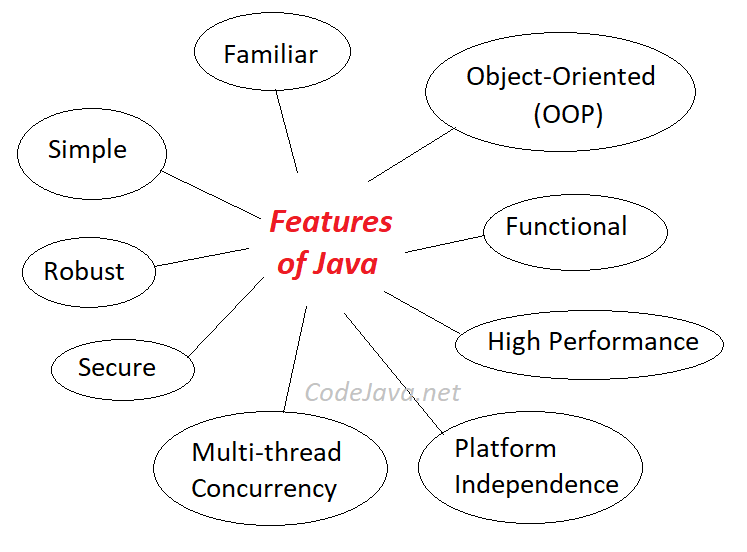
It’s like you need to learn the alphabet before learning how to read and write.Generally, Java is a simple, robust and secure programming language. Here are the most important features of Java:
1. Java is Simple:
The Java programming language is easy to learn. Java code is easy to read and write.
2. Java is Familiar:
Java is similar to C/C++ but it removes the drawbacks and complexities of C/C++ like pointers and multiple inheritances. So if you have background in C/C++, you will find Java familiar and easy to learn.
3. Java is an Object-Oriented programming language:
Since Java SE version 8 (JDK 8), Java is updated with functional programming feature like functional interfaces and Lambda Expressions. This increases the flexibility of Java.
5. Java is Robust:
With automatic garbage collection and simple memory management model (no pointers like C/C++), plus language features like generics, try-with-resources,… Java guides programmer toward reliable programming habits for creating highly reliable applications.
6. Java is Secure:
The Java platform is designed with security features built into the language and runtime system such as static type-checking at compile time and runtime checking (security manager), which let you creating applications that can’t be invaded from outside. You never hear about viruses attacking Java applications.
7. Java is High Performance:
Java code is compiled into bytecode which is highly optimized by the Java compiler, so that the Java virtual machine (JVM) can execute Java applications at full speed. In addition, compute-intensive code can be re-written in native code and interfaced with Java platform via Java Native Interface (JNI) thus improve the performance.
8. Java is Multithreaded:
The Java platform is designed with multithreading capabilities built into the language. That means you can build applications with many concurrent threads of activity, resulting in highly interactive and responsive applications.
9. Java is Platform Independence:
Java code is compiled into intermediate format (bytecode), which can be executed on any systems for which Java virtual machine is ported. That means you can write a Java program once and run it on Windows, Mac, Linux or Solaris without re-compiling. Thus the slogan “Write once, run anywhere” of Java.Besides the above features, programmers can benefit from a strong and vibrant Java ecosystem:
Java is powered by Oracle – one of the leaders in the industry. Java also gets enormous support from big technology companies like IBM, Google, Redhat,… so it has been always evolving over the years.
There are a lot of open source libraries which you can choose for building your applications.
There are many superior tools and IDEs that makes your Java development easier.
There are many frameworks that help you build highly reliable applications quickly.
The community around Java technology is very big and mature, so that you can get support easily.
Why use BufferedReader and BufferedWriter Classes In Java
Both BufferedReader and BufferedWriterin java are classified as buffered I/O streams. Buffered input streams read data from a memory area known as a buffer; the native input API is called only when the buffer is empty. Similarly, buffered output streams write data to a buffer, and the native output API is called only when the buffer is full.
For unbuffered I/O stream, each read or write request is handled directly by the underlying OS. This can make a program much less efficient, since each such request often triggers disk access, network activity, or some other operation that is relatively expensive. This means that instead of using BufferedReader, one can use the Scannerclass, and instead of using BufferedWriter, one can use PrintWriter.
BufferedReader is a class in Java that reads text from a character-input stream, buffering characters so as to provide for the efficient reading of characters, lines and arrays. The buffer size may be specified. If not, the default size, which is predefined, may be used.
In general, each read request made of a Reader causes a corresponding read request to be made of the underlying character or byte stream. It is therefore good practice to wrap a BufferedReaderaround any Reader whose read()operations may be costly, such asFileReaders and InputStreamReaders. For example,FileReader reader = new FileReader(“MyFile.txt”); BufferedReader bufferedReader = new BufferedReader(reader);
will buffer the input from the specified file. Without buffering, each invocation of read() or readLine() could cause bytes to be read from the file, converted into characters, and then returned, which can be very inefficient.
A BufferedWriter on the other hand is a java class that writes text to a character-output stream, while buffering characters so as to provide for the efficient writing of single characters, strings and arrays.
A newLine() method is provided, which uses the platform’s own notion of line separator as defined by the system property line.separator. Calling this method to terminate each output line is therefore preferred to writing a newline character directly.
In most occasions, a Writer sends its output immediately to the underlying character or byte stream. Unless prompt output is required, it is good practice to wrap a BufferedWriter around any Writer whose write() operations may be costly, such as FileWriters and OutputStreamWriters. For example,File outputFile = new File(“output.txt”); BufferedWriter bw = new BufferedWriter(new FileWriter(outputFile));
will buffer the PrintWriter’s output to the file. Without buffering, each invocation of a print() method would cause characters to be converted into bytes that would then be written immediately to the file, which can be very inefficient.
Both BufferedReader and BufferedWriterare used in order to achieve greater efficiency through use of buffers. A data buffer is generally a region in memory that is temporarily used. Instructing a BufferedWriter to write on a file, it does not do it directly. Rather, it stores what you want it to write in a buffer and writes it onto the file when you tell it to perform a flush operation. Flushing is the operation that tells the BufferedWriter to write everything onto the output file. Using a buffer is what makes both BufferedReader and BufferedWriter fast and efficient.
It is recommended to use buffered I/O streams as opposed to ScannerandPrintWriterclasses because of the following reasons:
They havesignificantly larger buffer memory than Scanner and Print Writer. It is recommended to use BufferedReader if you want to get long strings from a stream, and use Scanner if you want to parse specific type of token from a stream.
Buffered Streams aresynchronous while unbuffered are not.This means you can work with multiple threads when using Buffered Streams.
Scanner is memory and CPU heavy when compared to BufferedReader because it internally uses “regular expressions” for matching your “nextXXX” as opposed to just reading everything till the end of line as in the case of a regular Reader.
BufferedReader is a bit faster as compared to Scanner
An abstract class is a class that is declared abstract—it may or may not include abstract methods. Abstract classes cannot be instantiated, but they can be subclassed.
An abstract method is a method that is declared without an implementation (without braces, and followed by a semicolon), like this:
abstract void moveTo(double deltaX, double deltaY);
If a class includes abstract methods, then the class itself must be declared abstract, as in:
public abstract class GraphicObject {
// declare fields
// declare nonabstract methods
abstract void draw();
}
When an abstract class is subclassed, the subclass usually provides implementations for all of the abstract methods in its parent class. However, if it does not, then the subclass must also be declared abstract.
Note: Methods in an interface (see the Interfaces section) that are not declared as default or static are implicitly abstract, so the abstract modifier is not used with interface methods. (It can be used, but it is unnecessary.)
Abstract Classes Compared to Interfaces
Abstract classes are similar to interfaces. You cannot instantiate them, and they may contain a mix of methods declared with or without an implementation. However, with abstract classes, you can declare fields that are not static and final, and define public, protected, and private concrete methods. With interfaces, all fields are automatically public, static, and final, and all methods that you declare or define (as default methods) are public. In addition, you can extend only one class, whether or not it is abstract, whereas you can implement any number of interfaces.
Which should you use, abstract classes or interfaces?
Consider using abstract classes if any of these statements apply to your situation:
You want to share code among several closely related classes.
You expect that classes that extend your abstract class have many common methods or fields, or require access modifiers other than public (such as protected and private).
You want to declare non-static or non-final fields. This enables you to define methods that can access and modify the state of the object to which they belong.
Consider using interfaces if any of these statements apply to your situation:
You expect that unrelated classes would implement your interface. For example, the interfaces Comparable and Cloneable are implemented by many unrelated classes.
You want to specify the behavior of a particular data type, but not concerned about who implements its behavior.
You want to take advantage of multiple inheritance of type.
An example of an abstract class in the JDK is AbstractMap, which is part of the Collections Framework. Its subclasses (which include HashMap, TreeMap, and ConcurrentHashMap) share many methods (including get, put, isEmpty, containsKey, and containsValue) that AbstractMap defines.
An example of a class in the JDK that implements several interfaces is HashMap, which implements the interfaces Serializable, Cloneable, and Map
Note that many software libraries use both abstract classes and interfaces; the HashMap class implements several interfaces and also extends the abstract class AbstractMap.
An Abstract Class Example
In an object-oriented drawing application, you can draw circles, rectangles, lines, Bezier curves, and many other graphic objects. These objects all have certain states (for example: position, orientation, line color, fill color) and behaviors (for example: moveTo, rotate, resize, draw) in common. Some of these states and behaviors are the same for all graphic objects (for example: position, fill color, and moveTo). Others require different implementations (for example, resize or draw). All GraphicObjects must be able to draw or resize themselves; they just differ in how they do it. This is a perfect situation for an abstract superclass. You can take advantage of the similarities and declare all the graphic objects to inherit from the same abstract parent object (for example, GraphicObject) as shown in the following figure.
Classes Rectangle, Line, Bezier, and Circle Inherit from GraphicObject
Classes Rectangle, Line, Bezier, and Circle Inherit from GraphicObject
First, you declare an abstract class, GraphicObject, to provide member variables and methods that are wholly shared by all subclasses, such as the current position and the moveTo method. GraphicObject also declares abstract methods for methods, such as draw or resize, that need to be implemented by all subclasses but must be implemented in different ways. The GraphicObject class can look something like this:
abstract class GraphicObject {
int x, y;
…
void moveTo(int newX, int newY) {
…
}
abstract void draw();
abstract void resize();
}
Each nonabstract subclass of GraphicObject, such as Circle and Rectangle, must provide implementations for the draw and resize methods:
class Circle extends GraphicObject {
void draw() {
…
}
void resize() {
…
}
}
class Rectangle extends GraphicObject {
void draw() {
…
}
void resize() {
…
}
}
When an Abstract Class Implements an Interface
In the section on Interfaces, it was noted that a class that implements an interface must implement all of the interface’s methods. It is possible, however, to define a class that does not implement all of the interface’s methods, provided that the class is declared to be abstract. For example,
abstract class X implements Y {
// implements all but one method of Y
}
class XX extends X {
// implements the remaining method in Y
}
In this case, class X must be abstract because it does not fully implement Y, but class XX does, in fact, implement Y.
Class Members
An abstract class may have static fields and static methods. You can use these static members with a class reference (for example, AbstractClass.staticMethod()) as you would with any other class
What are the differences between static and dynamic (shared) library linking?
Tech Jitendra provides …
Before understanding the difference between static and dynamic (shared) library linking let’s see the life cycle of a typical program right from writing source code to its execution. A program is first written using any editor of programmer’s choice in form of a text file, then it has to be compiled in order to translate the text file into object code that a machine can understand and execute.
The program we write might make use of other programs (which is usually the case), or libraries of programs. These other programs or libraries must be brought together with the program we write in order to execute it.
Linking is the process of bringing external programs together required by the one we write for its successful execution. Static and dynamic linking are two processes of collecting and combining multiple object files in order to create a single executable. Here we will discuss the difference between them. Read full article on static and dynamic linking for more details.
Linking can be performed at both compile time, when the source code is translated into machine code; and load time, when the program is loaded into memory by the loader, and even at run time, by application programs. And, it is performed by programs called linkers. Linkers are also called link editors. Linking is performed as the last step in compiling a program.
After linking, for execution the combined program must be moved into memory. In doing so, there must be addresses assigned to the data and instructions for execution purposes. The above process can be summarized as program life cycle (write -> compile -> link -> load -> execute).
Following are the major differences between static and dynamic linking:Static LinkingDynamic Linking
Static linking is the process of copying all library modules used in the program into the final executable image. This is performed by the linker and it is done as the last step of the compilation process. The linker combines library routines with the program code in order to resolve external references, and to generate an executable image suitable for loading into memory. When the program is loaded, the operating system places into memory a single file that contains the executable code and data. This statically linked file includes both the calling program and the called program.
In dynamic linking the names of the external libraries (shared libraries) are placed in the final executable file while the actual linking takes place at run time when both executable file and libraries are placed in the memory. Dynamic linking lets several programs use a single copy of an executable module.
Static linking is performed by programs called linkers as the last step in compiling a program. Linkers are also called link editors.
Dynamic linking is performed at run time by the operating system.
Statically linked files are significantly larger in size because external programs are built into the executable files.
In dynamic linking only one copy of shared library is kept in memory. This significantly reduces the size of executable programs, thereby saving memory and disk space.
In static linking if any of the external programs has changed then they have to be recompiled and re-linked again else the changes won’t reflect in existing executable file.
In dynamic linking this is not the case and individual shared modules can be updated and recompiled. This is one of the greatest advantages dynamic linking offers.
Statically linked program takes constant load time every time it is loaded into the memory for execution.
In dynamic linking load time might be reduced if the shared library code is already present in memory.
Programs that use statically-linked libraries are usually faster than those that use shared libraries.
Programs that use shared libraries are usually slower than those that use statically-linked libraries.
In statically-linked programs, all code is contained in a single executable module. Therefore, they never run into compatibility issues.
Dynamically linked programs are dependent on having a compatible library. If a library is changed (for example, a new compiler release may change a library), applications might have to be reworked to be made compatible with the new version of the library. If a library is removed from the system, programs using that library will no longer work.
In Java, the size of an array is fixed when it is created. Elements are not allowed to be inserted or removed. However, it is possible to implement a dynamic array by allocating a new array and copying the contents from the old array to the new one.
Adynamic arrayhas variable size and allows elements to be added or removed. For this, we can allocate a fixed-size array and divide it into two parts:
the first part stores the elements of the dynamic array and
the second part is reserved, but not used.
Then we can add or remove elements at the end of the array by using the reserved space, until this space is completely consumed. After that, we create a bigger array and copy the contents of the old array to the new one.
Logical size (size): the number of elements in the dynamic array
Capacity: the physical size of the internal array (the maximum possible size without relocating storage)
We now design a classDynamicArrayrepresents dynamic arrays of integers. It has two attributes:
int[] data: an integer array, and
int size: the logical size, the number of elements used
The capacity of this dynamic array is simplydata.length.
An important method we need is to add elements to the end of the dynamic array. This method should provide automatic extension if the capacity is not large enough to hold the added element.
In summary, we wish to design the class DynamicArray with the following members:
Attributes / Constructors / Methods:
int[] data: the array storing the elements
int size: the number of elements
DynamicArray(): initialize this dynamic array with size 0
DynamicArray(int capacity): initialize this dynamic array with the capacity
int get(int index): get the element at the specified index
int set(int index, int element): set the value of the element at the specified index
boolean add(int element): add the element to the end of the array
void ensureCapacity(int minCapacity): increase the capacity
int size(): return the size of the dynamic array
boolean isEmpty(): check whether the array is empty
void clear(): clean up the elements
Implement the DynamicArray Class
The following contains the implementation of the class.
Note that,
The ArrayList class in the standard Java library uses essentially the same ideas as this example.
Today’s article will focus on understanding some key programming concepts in Java. These are: inheritance include polymorphism, interface and abstract class. Knowing how and when to use these concepts is what separates best programmers from okay programmers.
So lets dive in!
1. Interfaces
Taking an example in real life, we could say that essentially every sector or industry in the economy has some set of guidelines or conventions that must be followed by the players in that industry. For example, most companies must adhere to International Accounting Standards when preparing their financial statements. While the financial statements differ from company to company, they still must follow the guidelines set by the regulator. The financial statements can be private or accessed by the public. The standards are basically the interfaces.
In java, an interface is a reference type, similar to a class, that can containonlyconstants, method signatures, default methods, static methods, and nested types. Method bodies exist only for default methods and static methods.
It should be noted that interfaces cannot be instantiated as they can only beimplementedby classes orextendedby other interfaces. This is the basic difference between interfaces and classes. Also note that the method signatures in an interface have no braces and are terminated with a semicolon, which is not the case in a class method definition. An example of an interface would be:
Interfaces are used for abstraction. Since methods in interfaces does not have body, they have to be implemented by the class before you can access them. The class that implements interface must implement all the methods of that interface. To implement the above interface, we can have:
One more thing to note is that a class that implements an interface must implement all the methods declared in the interface. The methods must have the exact same signature (name + parameters) as declared in the interface.The class does not need to implement (declare) the variables of an interface. Only the methods.
A Java class can also implement multiple java interfaces. In that case the class must implement all the methods declared in all the interfaces implemented. An example would be the following class which implements two interfaces.
Also, it is possible for a java interface to inherit from another java interface, just like classes can inherit from other classes. You specify inheritance using theextendskeyword. Inheritance will be further discussed below. But unlike classes, interfaces can actually inherit from multiple interfaces. This is done by listing the names of all interfaces to inherit from, separated by comma. A class implementing an interface which inherits from multiple interfaces must implement all methods from the interface and its parent interfaces. An example is given below.
In summary, an interface is similar to a class because an interface can contain any number of methods. However, an interface is different from a class in several ways, in that you cannot instantiate an interface. It also does not contain any constructors.
2. Inheritance
Inheritance is the process wherein characteristics are inherited from ancestors. Inheritance in java can be defined as a mechanism where a new class is derived from an existing class. It is possible for classes to inherit or acquire the properties and methods of other classes, just like a son can acquire some traits and behaviour from his father.
For example, mammals is a super-class while human beings and animals are subclasses. Animals inherit all of the mammals’ properties. Subsequently, dogs can inherit all animals’ properties making it a subclass of the animals. The inheritance mechanism is very useful in code reuse. Classes can be derived from classes that are derived from classes that are derived from classes, and so on. In java, by default, theObjectclass is the parent class.
In Java inheritance is declared using the extends keyword. You declare that one classextendsanother class by using the extends keyword in the class definition. Here is Java inheritance example using the extends keyword:
In java, it is possible to reference a subclass as an instance of one of its super-classes. For instance, using the class definitions from the example above, it is possible to reference an instance of theCarclass as an instance of theVehicleclass. Because theCarclass inherits from theVehicleclass, it is also said tobeaVehicle.
ACarinstance is first created. Secondly, theCarinstance is assigned to a variable of type Vehicle. Now the Vehicle variable (reference) points to theCarinstance. This is possible because theCar class inherits from the Vehicle class.
In a subclass you can also override or redefine methods defined in the super-class. This makes it easy to manipulate your classes to suit the requirements.
On the down side, the Java inheritance mechanism does not include constructors. In other words, constructors of a super-class are not inherited by subclasses. Subclasses can still call the constructors in the super class using the super() construct. In fact, a subclass constructor is required to call one of the constructors in the super-class as the very first action inside the constructor body.
Other limitations of java class inheritance is that a subclass cannot inherit private members of its super-class. Constructor and initializer blocks cannot be inherited by a subclass. Also, a subclass can have only one super-class.
3. Polymorphism
This refers to the ability of an object to take on many forms. The most common use of polymorphism in Object Oriented Programming occurs when a parent class reference is used to refer to a child class object. Polymorphism in java occur in the form ofmethod overriding and method overloading.
In Java, it is possible to define two or more methods of same name in a class, provided that there argument list or parameters are different. This concept is known asMethod Overloading. An example is the area method, which takes in different parameters but does the same function.
In Java, a child class has the same method as of base class. In such cases child class overrides the parent class method without even touching the source code of the base class. This feature is known as method overriding.
4. Abstract classes
AJava abstract classis a class which cannot be instantiated. This basically means that you cannot create new instances of an abstract class. The purpose of an abstract class is to function as a base for subclasses. In java you declare that a class is abstract by adding the abstract keyword to the class declaration.
An abstract class can have abstract methods. You declare a method abstract by adding the abstract keyword in front of the method declaration, as shown above. Note that an abstract method has no implementation. It just has a method signature. Also, if a class has an abstract method, the whole class must be declared abstract. Not all methods in an abstract class have to be abstract methods. An abstract class can have a mixture of abstract and non-abstract methods.
Subclasses of an abstract class must implement (override) all abstract methods of its abstract super-class. The non-abstract methods of the super-class are just inherited as they are. They can also be overridden, if needed. Here is an example subclass of the abstract class MyAddition.
The only time a subclass of an abstract class is not forced to implement all abstract methods of its super-class, is if the subclass is also an abstract class.
In summary, the purpose of abstract classes is to function as base classes which can be extended by subclasses to create a full implementation. A question may arise as to:“What is the difference between an interface and an abstract class?”The answer is simple. Java interfaces are used to make the classes using the interface independent of the classes implementing the interface. Thus, you can exchange the implementation of the interface, without having to change the class using the interface. On the other hand, abstract classes are typically used as base classes for extension by subclass.
String Manipulations In C Programming Using Library Functions
Tech Jitendra providing,
In this article, you’ll learn to manipulate strings in C using library functions such as gets(), puts, strlen() and more. You’ll learn to get string from the user and perform operations on the string.
You need to often manipulatestringsaccording to the need of a problem. Most, if not all, of the time string manipulation can be done manually but, this makes programming complex and large.
To solve this, C supports a large number of string handling functions in thestandard library"string.h".
Few commonly used string handling functions are discussed below:
Strings handling functions are defined under"string.h"header file.
#include <string.h>
Note:You have to include the code below to run string handling functions.
gets() and puts()
Functions gets() and puts() are two string functions to take string input from the user and display it respectively as mentioned in the previous chapter.
#include<stdio.h>
int main()
{
char name[30];
printf("Enter name: ");
gets(name);//Function to read string from user.
printf("Name: ");
puts(name);//Function to display string.
return0;
}
Note:Though,gets()andputs()function handle strings, both these functions are defined in"stdio.h"header file.
Check out these examples to learn more:
C Program to Find the Length of a String
In this article, you’ll learn to find the length of a string without using strlen() function.
To understand this example, you should have the knowledge of followingC programmingtopics:
You can use standard library functionstrlen()to find the length of a string but, this program computes the length of a string manually without using strlen() funtion.
Example: Calculate Length of String without Using strlen() Function
#include<stdio.h>
int main()
{
char s[1000];
int i;
printf("Enter a string: ");
scanf("%s", s);
for(i =0; s[i]!='\0';++i);
printf("Length of string: %d", i);
return0;
}
Output
Enter a string: Programiz
Length of string: 9
C Program to Find the Length of a String
Tech Jitendra providing-
In this article, you’ll learn to find the length of a string without using strlen() function.
To understand this example, you should have the knowledge of followingC programmingtopics:
You can use standard library functionstrlen()to find the length of a string but, this program computes the length of a string manually without using strlen() funtion.
Example: Calculate Length of String without Using strlen() Function
10 Reasons to Learn Java Programming Language and Why Java is Best
Java is one of the best programming language created ever, and I am not saying this because I am a passionate Java developer, but Java has proved it in the last 20 years. Two decades is a big time for anyProgramming language, and Java has gained strength every passing day. Though there are times, when Java development slows down, but Java has responded well. Earlier with groundbreaking changes in the form ofEnum,Generics, and Autoboxing inJava 5, performance improvement with Java 6, functional programming using the lambda expressions inJava 8, and Google’s choice of language for Android apps development keeps Java as a front-line programming language.
Many computer science graduates often ask me, which is the best programming language to start with? which language should I learn to begin with? shall I learn Java? or shall I start withPythonetc?
Well, it depends upon the definition of your best programming language, if it’s popularity then obviously Java outscore everyone, even C, which is there for almost 50 years.
If it in terms of Job opportunities, again Java outscore everyone. You can get tons of Jobs opportunitybylearning Java programming language,youcan develop core Java-based server-side application, J2EE web and enterprise applications, and can even go for Android-based mobile application development.
So if you are not coming from C and C++ background, and want to learn your first programming language, I will suggest choosing Java.
In this article, I will share my list of reason, and why you should learn Java programming and why I think Java is the best programming language created ever.
Btw, if you have already made your mind on learning Java and just looking for the best resource to start with then I suggest you join The Complete Java Master Class on Udemy. One of the most up-to-date and comprehensive course to learn Java. It was recently updated for Java 11 as well.
Why you should learn Java Programming Language
Here is my list of 10 reasons, which I tell anyone who asks my opinion about learning Java, and whether Java is the best programming language in terms of opportunities, development and community support.
1) Java is Easy to learn
Many would be surprised to see this one of the top reason for learning Java or considering it as the best programming language, but it is. If you have a steep learning curve, it would be difficult to get productive in a short span of time, which is the case with most of the professional project.
Java has fluent English like syntax with minimum magic characters e.g. Generics angle brackets, which makes it easy to read Java program and learn quickly.
2) Java is an Object Oriented Programming Language
Another reason, which made Java popular is that it’s an Object Oriented Programming language. Developing OOP application is much easier, and it also helps to keep system modular, flexible and extensible.
Once you have knowledge of key OOP concepts likeAbstraction,Encapsulation,Polymorphism, andInheritance, you can use all those with Java. Java itself embodies many best practices and design pattern in its library.
One more reason for Java programming language’s huge success is it’s Rich API and most importantly it’s highly visible because come with Java installation.
When I first started Java programming, I used to code Applets and those days Applets provides great animation capability, which amazes new programmer like us, who are used to code in Turbo C++ editor.
Java provides API for I/O, networking, utilities, XML parsing, database connection, and almost everything. Whatever left is covered by open source libraries like Apache Commons, Google Guava, Jackson, Gson, Apache POI, and others.
4) Powerful development tools e.g. Eclipse, Netbeans
Believe it or not, Eclipse and Netbeans have played a huge role to make Java one of the best programming languages. Coding in IDE is a pleasure, especially if you have coded in DOS Editor or Notepad.
They not only help in code completion but also provides a powerfuldebugging capability, which is essential for real-world development. Integrated Development Environment (IDE) made Java development much easier, faster and fluent. It’s easy to search, refactor and read code using IDEs.
Apart from IDE, Java platform also has several other tools like Mavenand ANT for building Java applications,Jenkinsfor Continuous Integration and delivery, decompilers, JConsole, Visual VM for monitoring Heap usage, etc.
Open source libraries ensure that Java should be used everywhere. Apache, Google, and other organization have contributed a lot of great libraries, which makes Java development easy, faster and cost-effective.
There are frameworks like Spring, Struts, Maven, which ensures that Java development followsbest practices of software craftsmanship, promotes the use of design patterns and assisted Java developers to get there job done.
I always recommend searching for functionality in Google, before writing your own code. There is a good chance that it’s already coded, tested and available for ready to use.
A strong and thriving community is the biggest strength of Java programming language and platform. No matter, How good a language is, it wouldn’t survive, if there is no community to support, help and share their knowledge.
Java has been very lucky, it has lots of active forums, StackOverflow, open source organizations and several Java user groups to help everything.
There is the community to help beginners, advanced and even expert Java programmers. Java actually promotes taking and giving back to community habit. Lots of programmers, who use open source, contribute as a commiter, tester, etc.
Many Expert programmers provide advice FREE at various Java forums andStackOverflow. This is simply amazing and gives a lot of confidence to a newbie in Java.
7) Java is FREE
People like FREE things, Don’t you? So if a programmer wants to learn a programming language or an organization wants to use technology, COST is an important factor. Since Java is free from the start, i.e. you don’t need to pay anything to create Java application.
This FREE thing also helped Java to become popular among individual programmers, and among large organizations. If you are curiouswhere exactly Java is used in the real world, see that post. I have talked about Java’s adoption by all around the world.
Availability of Java programmers is another big thing, which makes an organization to chooseJavafor there strategic development.
8) Excellent documentation support – Javadocs
When I first saw Javadoc, I was amazed. It’s a great piece of documentation, which tells a lot of things about Java API. I think without Javadoc documentation, Java wouldn’t be as popular, and it’s one of the main reason, Why I think Java is the best programming language.
Not everyone has time and intention to look at the code to learn what a method does orhow to use a class. Javadoc made learning easy, and provide an excellent reference while coding in Java.
With the advent of IDEs like Eclipse andIntelliJIDEA, you don’t even need to look Javadoc explicitly in the browser, but you can get all the information in your IDE window itself.
9) Java is Platform Independent
In the 1990s, this was the main reason for Java’s popularity. The idea ofplatform independenceis great, and Java’s tagline“write once run anywhere” and acronym “WORA” was enticing enough to attract lots of new development in Java.
This is still one of the reason for Java being the best programming language, most of Java applications are developed in Windows environment and run onLinuxplatform.
10) Java is Everywhere
Yes, Java is everywhere, it’s on the desktop, it’s on mobile, it’s on the card, almost everywhere and so is Java programmers. I think Java programmer outnumber any other programming language professional.
Though I don’t have any data to back this up, it’s based on experience. This huge availability ofJava programmersis another reason, why organizations prefer to choose Java for new development than any other programming language.
Having said that, programming is a very big field and if you look at C and UNIX, which is still surviving and even stronger enough to live another 20 years, Java also falls in the same league.
Though there are a lot of talks about functional programming,Scala, and other JVM languages likeKotlinandGroovy, they need to go a long way to match the community, resources, and popularity of Java.
Also,OOPis one of the best programming paradigms, and as long as it will be there Java will remain solid.
Java is a popular general-purpose programming language and computing platform. It is fast, reliable, and secure. According to Oracle, the company that owns Java, Java runs on 3 billion devices worldwide.
Considering the number of Java developers, devices running Java, and companies adapting it, it’s safe to say that Java will be around for many years to come.
This guide will provide everything you need to know about Java programming language before you learn it. More specifically, you will learn about features of Java programming, its applications, reasons to learn it, and how you can learn it the right way.




 Tech Jitendra