Primitive types are the most basic data types available within the Java language. There are 8: boolean, byte, char, short, int, long, float and double. These types serve as the building blocks of data manipulation in Java. Such types serve only one purpose — containing pure, simple values of a kind. Because these data types are defined into the Java type system by default, they come with a number of operations predefined. You can not define a new operation for such primitive types. In the Java type system, there are three further categories of primitives:
Numeric primitives: short, int, long, float and double. These primitive data types hold only numeric data. Operations associated with such data types are those of simple arithmetic (addition, subtraction, etc.) or of comparisons (is greater than, is equal to, etc.)
Textual primitives: byte and char. These primitive data types hold characters (that can be Unicode alphabets or even numbers). Operations associated with such types are those of textual manipulation (comparing two words, joining characters to make words, etc.). However, byte and char can also support arithmetic operations.
All the primitive types have a fixed size. Thus, the primitive types are limited to a range of values. A smaller primitive type (byte) can contain less values than a bigger one (long).CategoryTypesSize (bits)Minimum ValueMaximum ValuePrecisionExampleIntegerbyte8-128127From +127 to -128byte b = 65;char160216-1All Unicode characters[1]char c = 'A'; char c = 65;short16-215215-1From +32,767 to -32,768short s = 65;int32-231231-1From +2,147,483,647 to -2,147,483,648int i = 65;long64-263263-1From +9,223,372,036,854,775,807 to -9,223,372,036,854,775,808long l = 65L;Floating-pointfloat322-149(2-2-23)·2127From 3.402,823,5 E+38 to 1.4 E-45float f = 65f;double642-1074(2-2-52)·21023From 1.797,693,134,862,315,7 E+308 to 4.9 E-324double d = 65.55;Otherboolean——false, trueboolean b = true;void———-
Integer primitive types silently overflow:
Code section 3.52: Several operators.1 int i = Integer.MAX_VALUE;
2 System.out.println(i);
3 i = i + 1;
4 System.out.println(i);
5 System.out.println(Integer.MIN_VALUE);
Console for Code section 3.522147483647
-2147483648
-2147483648
As Java is strongly typed, you can’t assign a floating point number (a number with a decimal point) to an integer variable:
Code section 3.53: Setting a floating point number as a value to an int(integer) type.1 int age;
2 age = 10.5;
A primitive type should be set by an appropriate value. The primitive types can be initialized with a literal. Most of the literals are primitive type values, except String Literals, which are instance of the String class.
Java programming concept possesses all the advanced programming features that the recent programming languages hold, in addition to these it holds something special which makes it the first of its kind. Following sections are to brief the major characteristics of Java programming.
Java is an object Oriented Programming (OOP) language. It incorporates almost every OOP features. Object creation through object template i.e. class, data abstraction and encapsulation, data and code sharing through inheritance, overloading concept through polymorphism, and data/process hiding etc. are some basic OOP features in Java, Java is a bit like C++ but more simpler than aristocrat C++. In fact, it is elegant language wherein the poorly understood, erratic, and redundant features of C++ have been eliminated. There are no business of pointers in Java – only lightly bounded heterogeneous collection of data/object. Absence of any kind of pointers means free from huge bugs because pointers manipulation is one of the richest source of bugs in almost all programs. Java is sophisticated enough to help programmers to express complex ideas . Here, global data and stand-alone function are not possible, again, unlike C/C++. The basic programming components in Java is objects which directly or indirectly decedent from the forefathers of classes. The class definition in Java permits both static and dynamic binding and therefore full reuse of code and data sharing. Java is truly Object Oriented Programming in the sense that many class definition can be inherited dynamically. However, Java does not support multiple inheritance whose semantic and usage has been quite controversial. Type casting or operator overloading is also not allowed in Java.
The microprocessor that is inside every computer can understand and execute only the machine codes i.e. in terms of 0�s and 1�s. But using high level programming, programmers use source code (English like) and using a translator, code is converted into the machine code relevant to the microprocessor. As the machine codes varies from microprocessor to microprocessor so what we need is that for same source code but for different microprocessor type different translator. Hence, a program (source code) when converted into the machine code for an Intel chip will vary from the version for a Motorola chip, which again will be different from the version for Sun workstation. The same problem exists in case of computers having same microprocessors but different operating systems.
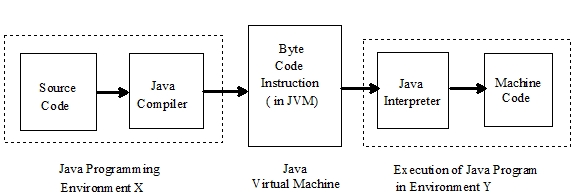
Java has overcome this problem of architecture and environment dependency. Java solves this problem using the concept what is called Java Virtual Machine (JVM). This JVM specifies wonderfully detailed with a dummy CPU and dummy instruction set that looks like standard assembly code. The Java compiler transforms the source programs into the instructions of JVM. The compiled Java code in known as byte code instruction (which are assembly code according to JVM). Next, Java interpreter is there which is specific to each environment (processor and OS) and converts the byte code instructions into the native processor instructions before executing it. Thus, converting a program source into an object code is compile half way and interpret half way. Figure 1.1illustrates this mechanism.
Figure 1.1 : Compilation of Java source code into object code
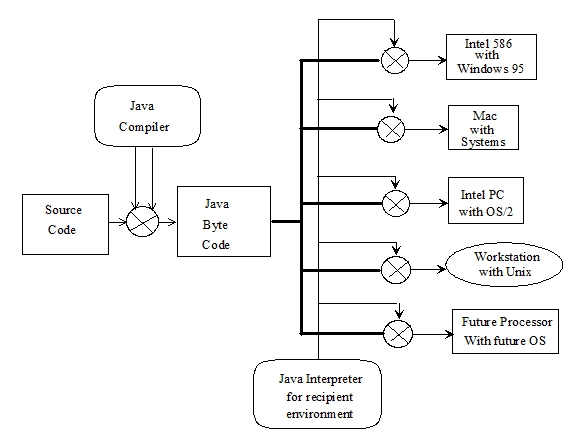
As the Java byte codes are architecture and operating system independent they are highly portable and can be executed on any system without change. This platform independence is illustrated in Figure 1.2
Figure 1.2 :Platform independent Java programming
Using the conventional programming languages like C or Pascal, if we need a slice of memory we have to allocate it and then to returns it to the system we are finished with it, Thus, here memory management is solely decided by the programmer. This overhead is eliminated in Java. Here, a program does not need to be malicious to suck up memory and not release it. Java controls all of the memory, Java�s run time system supports automatic garbage collectors based memory management system. Every once in a while, it will scan through all of the objects in a process to see if any of them are not used. The obsolete objects are reclaimed from the memory. As there no explicit memory manipulation is required by the programmer, so Java programs are highly robust
Another important contribution of Java is the support of multithreading. The multithreading is basically, the ability to run several tasks within the context of one large application. In more simpler version, a program is a list of instructions , and path through list of instructions is often called the thread of execution. In many cases, execution of a program through multiple threads makes more sense. For an example, suppose, a program needs to open a file, draw some thing on the screen, and print out something else. Each of these may require waiting for access to some resource. A multithreaded program can, in effect, start up three different threads of executions for these tasks. If the printing thread is waiting for more paper to be loaded in the printer, then the file thread and drawing thread can continue operating. In Java multithreading interpreter can keep track of all threads and switch among all of them, giving each a fair share of the processor�s attention. For most applications, multithreading improves interactive performance and real time system development. The multithreading encourages Java to interface and support several features of modern operating systems and network protocols.
Java is based on client /sever technology, After the accomplishment of source code into byte code translation, Java programs are in effect down loaded from host machines and then run on one�s client machine. Since Java programs are down loaded from all over the world, some precautions are needed to prevent malafide pieces of code called computer viruses embedded within the programs, causing problems to the recipient system and spreading it around. This therefore demands that distributed applications have to exhibit the highest level of security concerns. A byte code verifier in the Java interpreter looks at the incoming byte codes and verifies whether the compiled code is strictly language compliant, in case it founds illegal code, the run time system rejects the code and refuses to run it; thus trapping all malafide codes. Once the strict verification is over, the application proceeds to run and by this Java impotents security holes if any.
Java is one of the world’s most important and widely used computer languages, and it has held this distinction for many years. Unlike some other computer languages whose influence has weared with passage of time, while Java’s has grown.
As of 2012,
Java is one of the most popular programming languages in use, particularly for client-server web applications, with a reported 9 million developers using and working on it.
Creation of Java
Java was developed by James Ghosling, Patrick Naughton, Mike Sheridan at Sun Microsystems Inc. in 1991. It took 18 months to develop the first working version.
The initial name was Oak but it was renamed to Java in 1995 as OAK was a registered trademark of another Tech company.
Evolution of Java
Java was initially launched as Java 1.0 but soon after its initial release, Java 1.1 was launched. Java 1.1 redefined event handling, new library elements were added.
In Java 1.2 Swing and Collection framework was added and suspend(), resume() and stop() methods were deprecated from Thread class.
No major changes were made into Java 1.3but the next release that was Java 1.4contained several important changes. Keyword assert, chained exceptions and channel based I/O System was introduced.
Java 1.5 was called J2SE 5, it added following major new features :
Generics
Annotations
Autoboxing and autounboxing
Enumerations
For-each Loop
Varargs
Static Import
Formatted I/O
Concurrency utilities
Next major release was Java SE 7 which included many new changes, like :
Now String can be used to control Switch statement.
Multi Catch Exception
try-with-resource statement
Binary Integer Literals
Underscore in numeric literals, etc.
And the latest addition to the lot is, Java SE 8, it was released on March 18, 2014. Some of the major new features introduced in JAVA 8 are,
Lambda Expressions
New Collection Package java.util.stream to provide Stream API.
Enhanced Security
Nashorn Javascript Engine included
Parallel Array Sorting
The JDBC-ODBC Bridge has been removed etc.
Application of Java
Java is widely used in every corner of world and of human life. Java is not only used in softwares but is also widely used in designing hardware controlling software components. There are more than 930 million JRE downloads each year and 3 billion mobile phones run java.
Following are some other usage of Java :
Developing Desktop Applications
Web Applications like Linkedin.com, Snapdeal.com etc
An exception (or exceptional event) is a problem that arises during the execution of a program. When an Exception occurs the normal flow of the program is disrupted and the program/Application terminates abnormally, which is not recommended, therefore, these exceptions are to be handled.
An exception can occur for many different reasons. Following are some scenarios where an exception occurs.
A user has entered an invalid data.
A file that needs to be opened cannot be found.
A network connection has been lost in the middle of communications or the JVM has run out of memory.
Some of these exceptions are caused by user error, others by programmer error, and others by physical resources that have failed in some manner.
Based on these, we have three categories of Exceptions. You need to understand them to know how exception handling works in Java.
Checked exceptions − A checked exception is an exception that is checked (notified) by the compiler at compilation-time, these are also called as compile time exceptions. These exceptions cannot simply be ignored, the programmer should take care of (handle) these exceptions.
For example, if you use FileReader class in your program to read data from a file, if the file specified in its constructor doesn’t exist, then a FileNotFoundException occurs, and the compiler prompts the programmer to handle the exception.
Example
Live Demoimport java.io.File;
import java.io.FileReader;
public class FilenotFound_Demo {
public static void main(String args[]) {
File file = new File(“E://file.txt”);
FileReader fr = new FileReader(file);
}
}
If you try to compile the above program, you will get the following exceptions.
Output
C:\>javac FilenotFound_Demo.java
FilenotFound_Demo.java:8: error: unreported exception FileNotFoundException; must be caught or declared to be thrown
FileReader fr = new FileReader(file);
^
1 error
Note − Since the methods read() and close() of FileReader class throws IOException, you can observe that the compiler notifies to handle IOException, along with FileNotFoundException.
Unchecked exceptions − An unchecked exception is an exception that occurs at the time of execution. These are also called as Runtime Exceptions. These include programming bugs, such as logic errors or improper use of an API. Runtime exceptions are ignored at the time of compilation.
For example, if you have declared an array of size 5 in your program, and trying to call the 6th element of the array then an ArrayIndexOutOfBoundsExceptionexceptionoccurs.
Example
Live Demopublic class Unchecked_Demo {
public static void main(String args[]) {
int num[] = {1, 2, 3, 4};
System.out.println(num[5]);
}
}
If you compile and execute the above program, you will get the following exception.
Output
Exception in thread “main” java.lang.ArrayIndexOutOfBoundsException: 5
at Exceptions.Unchecked_Demo.main(Unchecked_Demo.java:8)
Errors − These are not exceptions at all, but problems that arise beyond the control of the user or the programmer. Errors are typically ignored in your code because you can rarely do anything about an error. For example, if a stack overflow occurs, an error will arise. They are also ignored at the time of compilation.
Exception Hierarchy
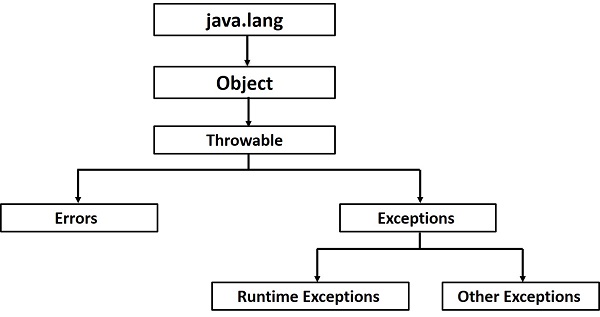
All exception classes are subtypes of the java.lang.Exception class. The exception class is a subclass of the Throwable class. Other than the exception class there is another subclass called Error which is derived from the Throwable class.
Errors are abnormal conditions that happen in case of severe failures, these are not handled by the Java programs. Errors are generated to indicate errors generated by the runtime environment. Example: JVM is out of memory. Normally, programs cannot recover from errors.
The Exception class has two main subclasses: IOException class and RuntimeException Class.
Following is the list of important methods available in the Throwable class.Sr.No.Method & Description1
public String getMessage()
Returns a detailed message about the exception that has occurred. This message is initialized in the Throwable constructor.2
public Throwable getCause()
Returns the cause of the exception as represented by a Throwable object.3
public String toString()
Returns the name of the class concatenated with the result of getMessage().4
public void printStackTrace()
Prints the result of toString() along with the stack trace to System.err, the error output stream.5
public StackTraceElement [] getStackTrace()
Returns an array containing each element on the stack trace. The element at index 0 represents the top of the call stack, and the last element in the array represents the method at the bottom of the call stack.6
public Throwable fillInStackTrace()
Fills the stack trace of this Throwable object with the current stack trace, adding to any previous information in the stack trace.
Catching Exceptions
A method catches an exception using a combination of the try and catch keywords. A try/catch block is placed around the code that might generate an exception. Code within a try/catch block is referred to as protected code, and the syntax for using try/catch looks like the following −
The code which is prone to exceptions is placed in the try block. When an exception occurs, that exception occurred is handled by catch block associated with it. Every try block should be immediately followed either by a catch block or finally block.
A catch statement involves declaring the type of exception you are trying to catch. If an exception occurs in protected code, the catch block (or blocks) that follows the try is checked. If the type of exception that occurred is listed in a catch block, the exception is passed to the catch block much as an argument is passed into a method parameter.
Example
The following is an array declared with 2 elements. Then the code tries to access the 3rd element of the array which throws an exception.Live Demo// File Name : ExcepTest.java
import java.io.*;
public class ExcepTest {
public static void main(String args[]) {
try {
int a[] = new int[2];
System.out.println(“Access element three :” + a[3]);
} catch (ArrayIndexOutOfBoundsException e) {
System.out.println(“Exception thrown :” + e);
}
System.out.println(“Out of the block”);
}
}
This will produce the following result −
Output
Exception thrown :java.lang.ArrayIndexOutOfBoundsException: 3
Out of the block
Constructor is a block of code that initializes the newly created object. A constructor resembles an instance method in java but it’s not a method as it doesn’t have a return type. In short constructor and method are different(More on this at the end of this guide). People often refer constructor as special type of method in Java.
Constructor has same name as the class and looks like this in a java code.public class MyClass{
//This is the constructor
MyClass(){
}
..
}
Note that the constructor name matches with the class name and it doesn’t have a return type.
How does a constructor work
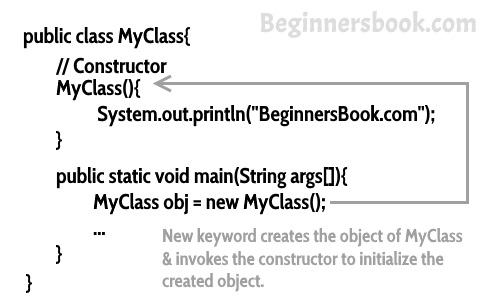
To understand the working of constructor, lets take an example. lets say we have a class MyClass. When we create the object of MyClass like this:MyClass obj = new MyClass()
The new keyword here creates the object of class MyClass and invokes the constructor to initialize this newly created object.
You may get a little lost here as I have not shown you any initialization example, lets have a look at the code below:
A simple constructor program in java
Here we have created an object obj of class Hello and then we displayed the instance variable name of the object. As you can see that the output is BeginnersBook.com which is what we have passed to the name during initialization in constructor. This shows that when we created the object obj the constructor got invoked. In this example we have used this keyword, which refers to the current object, object obj in this example. We will cover this keyword in detail in the next tutorial.public class Hello {
String name;
//Constructor
Hello(){
this.name = “BeginnersBook.com”;
}
public static void main(String[] args) {
Hello obj = new Hello();
System.out.println(obj.name);
}
}
Output:BeginnersBook.com
Types of Constructors
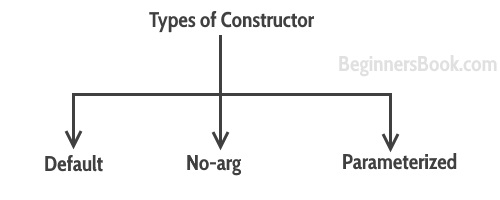
There are three types of constructors: Default, No-arg constructor and Parameterized.
Default constructor
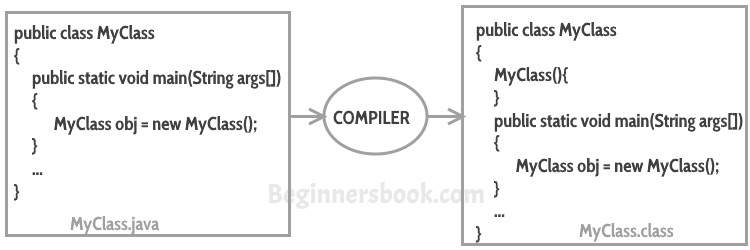
If you do not implement any constructor in your class, Java compiler inserts a default constructor into your code on your behalf. This constructor is known as default constructor. You would not find it in your source code(the java file) as it would be inserted into the code during compilation and exists in .class file. This process is shown in the diagram below:
If you implement any constructor then you no longer receive a default constructor from Java compiler.
no-arg constructor:
Constructor with no arguments is known as no-arg constructor. The signature is same as default constructor, however body can have any code unlike default constructor where the body of the constructor is empty.
Although you may see some people claim that that default and no-arg constructor is same but in fact they are not, even if you write public Demo() { }in your class Demo it cannot be called default constructor since you have written the code of it.
Example: no-arg constructor
class Demo
{
public Demo()
{
System.out.println(“This is a no argument constructor”);
}
public static void main(String args[]) {
new Demo();
}
}
In this example we have a parameterized constructor with two parameters id and name. While creating the objects obj1 and obj2 I have passed two arguments so that this constructor gets invoked after creation of obj1 and obj2.public class Employee {
int empId;
String empName;
//parameterized constructor with two parameters
Employee(int id, String name){
this.empId = id;
this.empName = name;
}
void info(){
System.out.println(“Id: “+empId+” Name: “+empName);
}
public static void main(String args[]){
Employee obj1 = new Employee(10245,”Chaitanya”);
Employee obj2 = new Employee(92232,”Negan”);
obj1.info();
obj2.info();
}
}
It provides a clear modular structure for programs which makes it good for defining abstract datatypes in which implementation details are hidden
Objects can also be reused within an across applications. The reuse of software also lowers the cost of development. More effort is put into the object-oriented analysis and design, which lowers the overall cost of development.
It makes software easier to maintain.Since the design is modular, part of the system can be updated in case of issues without a need to make large-scale changes
Reuse also enables faster development. Object-oriented programming languages come with rich libraries of objects, and code developed during projects is also reusable in future projects.
It provides a good framework for code libraries where the supplied software components can be easily adapted and modified by the programmer. This is particularly useful for developing graphical user interfaces.
Better Productivity as OOP techniques enforce rules on a programmer that, in the long run, help her get more work done; finished programs work better, have more features and are easier to read and maintain. OOP programmers take new and existing software objects and “stitch” them together to make new programs. Because object libraries contain many useful functions, software developers don’t have to reinvent the wheel as often; more of their time goes into making the new program.
An interface is a reference type in Java. It is similar to class. It is a collection of abstract methods. A class implements an interface, thereby inheriting the abstract methods of the interface.
Along with abstract methods, an interface may also contain constants, default methods, static methods, and nested types. Method bodies exist only for default methods and static methods.
Writing an interface is similar to writing a class. But a class describes the attributes and behaviors of an object. And an interface contains behaviors that a class implements.
Unless the class that implements the interface is abstract, all the methods of the interface need to be defined in the class.
An interface is similar to a class in the following ways −
An interface can contain any number of methods.
An interface is written in a file with a .java extension, with the name of the interface matching the name of the file.
The byte code of an interface appears in a .class file.
Interfaces appear in packages, and their corresponding bytecode file must be in a directory structure that matches the package name.
However, an interface is different from a class in several ways, including −
You cannot instantiate an interface.
An interface does not contain any constructors.
All of the methods in an interface are abstract.
An interface cannot contain instance fields. The only fields that can appear in an interface must be declared both static and final.
An interface is not extended by a class; it is implemented by a class.
An interface can extend multiple interfaces.
Declaring Interfaces
The interface keyword is used to declare an interface. Here is a simple example to declare an interface −
Example
Following is an example of an interface −/* File name : NameOfInterface.java */
import java.lang.*;
// Any number of import statements
public interface NameOfInterface {
// Any number of final, static fields
// Any number of abstract method declarations\
}
Interfaces have the following properties −
An interface is implicitly abstract. You do not need to use the abstract keyword while declaring an interface.
Each method in an interface is also implicitly abstract, so the abstract keyword is not needed.
Methods in an interface are implicitly public.
Example
/* File name : Animal.java */
interface Animal {
public void eat();
public void travel();
}
Implementing Interfaces
When a class implements an interface, you can think of the class as signing a contract, agreeing to perform the specific behaviors of the interface. If a class does not perform all the behaviors of the interface, the class must declare itself as abstract.
A class uses the implements keyword to implement an interface. The implements keyword appears in the class declaration following the extends portion of the declaration.
Example
/* File name : MammalInt.java */
public class MammalInt implements Animal {
public void eat() {
System.out.println(“Mammal eats”);
}
public void travel() {
System.out.println(“Mammal travels”);
}
public int noOfLegs() {
return 0;
}
public static void main(String args[]) {
MammalInt m = new MammalInt();
m.eat();
m.travel();
}
}
similar to class. It is a collection of abstract methods. A class implements an interface, thereby inheriting the abstract methods of the interface.
Along with abstract methods, an interface may also contain constants, default methods, static methods, and nested types. Method bodies exist only for default methods and static methods.
Writing an interface is similar to writing a class. But a class describes the attributes and behaviors of an object. And an interface contains behaviors that a class implements.
Unless the class that implements the interface is abstract, all the methods of the interface need to be defined in the class.
An interface is similar to a class in the following ways −
An interface can contain any number of methods.
An interface is written in a file with a .java extension, with the name of the interface matching the name of the file.
The byte code of an interface appears in a .class file.
Interfaces appear in packages, and their corresponding bytecode file must be in a directory structure that matches the package name.
However, an interface is different from a class in several ways, including −
You cannot instantiate an interface.
An interface does not contain any constructors.
All of the methods in an interface are abstract.
An interface cannot contain instance fields. The only fields that can appear in an interface must be declared both static and final.
An interface is not extended by a class; it is implemented by a class.
An interface can extend multiple interfaces.
Declaring Interfaces
The interface keyword is used to declare an interface. Here is a simple example to declare an interface −
Example
Following is an example of an interface −/* File name : NameOfInterface.java */
import java.lang.*;
// Any number of import statements
public interface NameOfInterface {
// Any number of final, static fields
// Any number of abstract method declarations\
}
Interfaces have the following properties −
An interface is implicitly abstract. You do not need to use the abstract keyword while declaring an interface.
Each method in an interface is also implicitly abstract, so the abstract keyword is not needed.
Methods in an interface are implicitly public.
Example
/* File name : Animal.java */
interface Animal {
public void eat();
public void travel();
}
Implementing Interfaces
When a class implements an interface, you can think of the class as signing a contract, agreeing to perform the specific behaviors of the interface. If a class does not perform all the behaviors of the interface, the class must declare itself as abstract.
A class uses the implements keyword to implement an interface. The implements keyword appears in the class declaration following the extends portion of the declaration.
Example
/* File name : MammalInt.java */
public class MammalInt implements Animal {
public void eat() {
System.out.println(“Mammal eats”);
}
public void travel() {
System.out.println(“Mammal travels”);
}
public int noOfLegs() {
return 0;
}
public static void main(String args[]) {
MammalInt m = new MammalInt();
m.eat();
m.travel();
}
}
This will produce the following result −
Output
Mammal eats
Mammal travels
When overriding methods defined in interfaces, there are several rules to be followed −
Checked exceptions should not be declared on implementation methods other than the ones declared by the interface method or subclasses of those declared by the interface method.
The signature of the interface method and the same return type or subtype should be maintained when overriding the methods.
An implementation class itself can be abstract and if so, interface methods need not be implemented.
When implementation interfaces, there are several rules −
A class can implement more than one interface at a time.
A class can extend only one class, but implement many interfaces.
An interface can extend another interface, in a similar way as a class can extend another class.
Extending Interfaces
An interface can extend another interface in the same way that a class can extend another class. The extends keyword is used to extend an interface, and the child interface inherits the methods of the parent interface.
The following Sports interface is extended by Hockey and Football interfaces.
Example
// Filename: Sports.java
public interface Sports {
public void setHomeTeam(String name);
public void setVisitingTeam(String name);
}
// Filename: Football.java
public interface Football extends Sports {
public void homeTeamScored(int points);
public void visitingTeamScored(int points);
public void endOfQuarter(int quarter);
}
// Filename: Hockey.java
public interface Hockey extends Sports {
public void homeGoalScored();
public void visitingGoalScored();
public void endOfPeriod(int period);
public void overtimePeriod(int ot);
}
The Hockey interface has four methods, but it inherits two from Sports; thus, a class that implements Hockey needs to implement all six methods. Similarly, a class that implements Football needs to define the three methods from Football and the two methods from Sports.
Inheritance in Java is a mechanism in which one object acquires all the properties and behaviors of a parent object. It is an important part of OOPs (Object Oriented programming system).
The idea behind inheritance in Java is that you can create new classes that are built upon existing classes. When you inherit from an existing class, you can reuse methods and fields of the parent class. Moreover, you can add new methods and fields in your current class also.
Inheritance represents the IS-A relationship which is also known as a parent-child relationship.
Why use inheritance in java
For Method Overriding (so runtime polymorphism can be achieved).
For Code Reusability.
Terms used in Inheritance
Class: A class is a group of objects which have common properties. It is a template or blueprint from which objects are created.
Sub Class/Child Class: Subclass is a class which inherits the other class. It is also called a derived class, extended class, or child class.
Super Class/Parent Class: Superclass is the class from where a subclass inherits the features. It is also called a base class or a parent class.
Reusability: As the name specifies, reusability is a mechanism which facilitates you to reuse the fields and methods of the existing class when you create a new class. You can use the same fields and methods already defined in the previous class.
The syntax of Java Inheritance
class Subclass-name extends Superclass-name
{
//methods and fields
}
The extends keyword indicates that you are making a new class that derives from an existing class. The meaning of “extends” is to increase the functionality.
In the terminology of Java, a class which is inherited is called a parent or superclass, and the new class is called child or subclass.
Generally the statements inside your java code are executed from top to bottom, in the order that they appear. Control flow statements, change or break the flow of execution by implementing decision making, looping, and branching your program to execute particular blocks of code based on the conditions.
There are 3 types of control flow statements supported by the Java programming language.
The if-then statement is the most basic of all the control flow statements. It enables your program to execute a certain section of code depending on the state of variables, or values returned from methods.if(isCar)
{
System.out.println("I am a Car");
}
If isCar test evaluates to false, control jumps to the end of the if-then statement. In Java, the opening and closing braces are optional.But this is applicable only if the block of code to be executed is just a single statement:if(isCar)
System.out.println("I am a Car");
But as a good practice, it is advisable to put the brackets around the statements, even if there is only one statement to execute.This is because, in the begining you may start with one statement and later during the development phase you may add more statements. During this a common mistake would be forgetting to add the newly required braces which compiler cannot catch.
The if-then-else Statement
The if-then-else statement provides a alternate path of execution when an “if” clause evaluates to false.if(isCar)
{
System.out.println("I am a Car");
}
else
{
System.out.println("I am a Truck");
}
Chaining if Statements
You can chain if-else statements, and create a decision tree sort of thing.if(vehicle="Car")
{
System.out.println("I am a Car");
}
else if(vehicle="Truck")
{
System.out.println("I am a Truck");
}
else
{
System.out.println("I am a Bike");
}
In some other example, there could be a chance that it can satisfy more than one expression in the statements. But in Java, once a condition is satisfied and appropriate statements are executed then the remaining conditions are skipped.
Switch statement
Another way to control the flow of your programs with decision-making statements is by a switch statement. A switch statement gives you the option to test for a range of values for your variables. If you think your if-else-if statements is long and complex, you can use switch statement instead.class SwitchDemo {
public static void main(String[] args) {
int age = 3;
String yourAge;
switch (age) {
case 1: System.out.println("You are one yr old");
break;
case 2: System.out.println("You are two yr old");
break;
case 3: System.out.println("You are three yr old");
break;
default: System.out.println("You are more than three yr old");
break;
}
}
}
The body of a switch statement is known as a switch block. The switch statement evaluates its expression within the brackets, then executes all statements that follow the matching case label. Again there might be more than one cases being matched but switch will choose the first immidiate matching case ignoring the others.
break statement is necessary.Because without it, statements in switch blocks fall through. Lets take a look at below program:class SwitchDemo {
public static void main(String[] args) {
int age = 2;
String yourAge;
switch (age) {
case 1: System.out.println("You are one yr old");
case 2: System.out.println("You are two yr old");
case 3: System.out.println("You are three yr old");
default: System.out.println("You are more than three yr old");
break;
}
}
}
Output will be:You are two yr old
You are three yr old
You are more than three yr old


 Tech Jitendra