HISTORY OF JAVA

History of Java

Wish you all Happy Vasant Panchami ….. माँ शारदे की कृपा आप सभी पर बनी रहे 👏👏👏👏👏👏👏

This article is guided by Bipin Ajay & It is very helpful article for IT sector beginner’s.

1991

Stealth Project for consumer electronics market (later Green Project)

Language called Oak then renamed to Java

1993

First Person Project for set-top boxes

1994

LiveOak Project for new OS

HotJava Web Browser

1995

Sun formally announces Java at SunWorld

Netscape incorporates support for Java – Internet Explorer add support for Java

1996

JDK 1.0 Basic support for AWT

1997

JDK 1.1 JavaBeans, RMI, AWT, JDBC, servlets, JNDI, JFC, EJB

1998

Java 1.2 Reflection, Swing, Java Collections Framework, plug-in, IDL

Becomes known as Java 2, Port to Linux, Java Community Process

1999

Jini, PersonalJava, Java 2 Source Code, XML support, JavaServer Pages, Java Editions (J2ME, J2SE, J2EE)

2000

J2SE 1.3 HotSpot, RMI/CORBA, JavaSound, JNDI , JPDA

2001

Java Connector Architecture, patterns catalog, Java Web Start 1.0, J2EE 1.3

2002

J2SE 1.4 assert, regular expressions, exception chaining, NIO, logging, image I/O, integrated XML/XSLT, integrated Web Start, integrated JCE, JSSE, JAAS, J2EE 1.4 beta (Web Services)

2004

J2SE 1.5 (Java 5) Generics, auto-boxing, metadata (annotations), enums, “for-each”

2005

Java 10th Anniversary

2006

Java 1.6 (Java 6)

Thanking You

Tech Jitendra

Tools Available for Java Programming

Guided by Bipin Ajay , It is a very helpful article for IT aspirants.

The tools those are essential /available for Java programming environment are JDK(Java Developer�s Kit), Java Packages, Java Enabled web browsers and other Third party tools. Each of these are briefly outlined below :

Java Developer�s Kit (JDK)

The Java Developer�s Kit from Java Soft, a division of Sun Micro systems, contains the basic tools and libraries necessary for creating and executing Java programs. It consist of a library of standard classes and a collection of utilities for building, testing, and documenting Java programs. The core Java Application Programming Interface (API) is the aforementioned library of prefabricated classes. One need these classes to access the core functionality of the Java language. The core Java API includes some important language construct (including string data types and exceptions ), as well as basic graphics, network, and file I/O. As for the JDK utilities, there are seven main programs in the kit :

1.javac:The Java compiler. This program compiles Java source codes into byte codes.
2.java:The Java interpreter. This program runs Java byte codes.
3.javadoc:Generates API documentation in HTML format from Java source code.
4.appletviewer:A Java interpreter that executes Java applet (a special kind of Java Program) classes.
5.jdb:The Java debugger. Helps us find and fix bugs in Java programs.
6.javap:The Java disassembler. Displays the accessible functions and data in a compiled class file. It also displays the meaning of the byte codes.
7.javah:Creates C header files that can be used to make C routines, that can call Java routines,or make C routines that can be called by Java programs.

JDK is a free software and can be down loaded from Java Soft�s web site at http://java .sun.com

Java Packages

The Java language provides suite of packages that include a windowing tool kit, utilities,, general I/O, tools, and networking. Following mentioned six packages are very popular:

1.java.applet: This package includes classes designed for use within an applet. There is one class, Applet and three interfaces AppletContex, AppletStub, and AudioClip.
2.java.awt :The Abstract Windowing Toolkit (AWT) package, awt, contains classes used to generate widgets and GUI (Graphical User Interface) components. This package includes the classes: Button, CheckBox, Choice, Component, Graphics, Menu, Panel, TextArea, and TextField.
3.java.io :The I/O Package include file input and output classes such as the classes FileInputStream and FileOutputStream. File I/O in subject to Security Control in applets.
4.java.lang:This package includes the Java language classes, including Object, Thread, Exception, System, Integer, Float, Math, String, and so on.
5.java.net :This class supports the TCP/IP networking protocols and includes the Socket, SenverSocket, DatagramPacket, DategramSocket, URL, and URLConnection classes among others.
6.java.util:This class packages contains miscellaneons classes that are useful for a variety of programming chores. Those classes include Date, Dictionary, Random (for creating random number), Vector, and Stack (for implementing a last-in-first-out (LIFO) stack).

Java -Enabled Web Browser

With Internet, Web Browser is a very important program. A Web Browser is nothing but a viewer program used by the client machine to display Web documents. A Jab-Enabled browser is a browser that supports Java applets. Currently many Java-capable Web Browser are known, out of which, most popular are HotJava, Netscape Navigator, and Microsoft Internet Explorer. All these Browser software are free releases and can be down loaded from the respective manufacturer�s web site as listed below:

1.HotiJova from Java soft�s Web sitehttp://java.sun.com 
2.Navigator from Netscape�s home pagehttp://home.netscape.com 
3.Internet Explorer from Microsoft�s Web page http://www.microsoft.com

Other Third-party Tools

A lot of third party tools are currently available in the market in order to support the productivity of the software development using Java. Important of them are listed as below:

1.Sun�s Java Workshop dev 5 from Sun�s Javasoft provids most robust development environment for Java. The recent addition with this is Visual Java. 
2.Ed for Windows from Soft As It Get provides an Integrated Development Environment ( IDE) for Java. It makes Java programming extremely easy and also provides one of the most powefull source code editor.
3.Mojo from Penumbra Software is one of the best visual environments for creating Java applets. Its primary goal is to allow rapid generation of Java applets without writing code.
4.Jamba from Aimtech and IBM is another graphical applet builder and very powerful in Java environment.
5.Semantic Cafe from Semantic another very powerful and is fully integrated Development Environment (IDE). This is aimed for professional application developers and programmers. Currently Cafe is the de facto standard for Java development on Windows NT/95.

Assignment

Q:Explain JDK, JRE and JVM.Q:Why Java is platform independent?Q:Why java is not 100% Object-oriented?Q:List any five features of Java?Q:Which component is used to compile, debug and execute java program?Q:Which component is responsible to run java program?Q:What is use of interpreter?

Q&A

Q:I know a lot about HTML, but not much about computer programming. Can I still write Java programs?A:If you have no programming experience whatsoever, you most likely will find programming Java significantly more difficult than HTML. However, Java is an excellent language to learn programming with, and if you patiently work through the examples and the exercises in this book, you should be able to learn enough to get started with Java.Q:What’s the relationship between JavaScript and Java?A:They have the same first four letters. 
A common misconception in the Web world today is that Java and JavaScript have more in common than they actually do. Java is the general-purpose programming language that you’ll learn about in this book; you use it to create applets. JavaScript is a Netscape-invented scripting language that looks sort of like Java; with it you can do various nifty things in Web pages. They are independent languages, used for different purposes. If you’re interested in JavaScript programming, you’ll want to pick up another book, such as Teach Yourself JavaScript in a Week or Laura Lemay’s Web Workshop: JavaScript, both also available from Sams.net Publishing.Q:What is Hot Java?A:Hot Java was the first Web browser that could download and play (execute) Java applets.Hot Java, created by Sun, is simply a browser, much like the Netscape Navigator or Microsoft’s Internet Exploere.Although Hot Java was the first browser to support Java applets, many browsers now support or will soon support applets.Starting with Netscape Navigator 2.0 for example, you can play Java applets for many platforms (Windows 95, the Mac and so on.).Another distinguishing feature of Hot Java is that unlike most browsers which are written in C/C++.Hot Java browser is written with the Java programming language.Q:I followed all the directions you gave for creating a Java applet. I loaded it into HotJava, but Hello World didn’t show up. What did I do wrong?A:Don’t use HotJava to view applets you’ve created in this book; get a more up-to-date browser such as Netscape or Internet Explorer. HotJava was an experimental browser and has not been updated since soon after its original release. The steps you take to define and write an applet have changed since then, and the applets you write now will not run on HotJava.Q:What is static in Java?A:Static means one per class, not one for each object no matter how many instance of a class might exist. This means that you can use them without creating an instance of a class.
Static methods are implicitly final, because overriding is done based on the type of the object and static methods are attached to a class, not an object.
A static method in a superclass can be shadowed by another static method in a sub class, as long as the original method was not declared final.
However, you can’t override a static method with a non static method. In other words, you can’t change a static method into an instance method of a subclass.
Q:Why java does not support pointers?A:Because pointers are unsafe, Java uses reference types to hide pointer and programmers feel easier to deal with reference types without pointers.Q:I’m using Notepad on Windows to edit my Java files. The program insists on adding a .txt extension to all my files, regardless of what I name them (so I always end up with files like HelloWorld.java.txt). Short of renaming them before I compile them, what else can I do to fix this?Q:What is a platform?A:A platform is the hardware or software environment in which a program runs.
Most platforms can be described as a combination of the operating system and hardware, like Windows 2000/XP, Linux, Solaris and MacOs.Q:What is a JVM consists of?A:Each time of a Java Application is executed then an instance of JVM, responsible for its running, is created.
A JVM instance is described in terms of subsystems, memory areas, data types, and instructions.Q:How Java enabled high performance?A:Java uses Just In Time compiler to enable high performance.
Just-In-Time compiler is a program that runs Java bytecode, which is a program that contains instructions that must be interpreted into instructions that can be sent directly to the processor.Q:What is JTI compiler?A:Just In Time compiler: It is used to improve the performance.
JIT compiles parts of the byte code that have similar functionality at the same time, and hence reduces the amount of time needed for compilation.
Here the term compiler refers to translator from the instruction set of a Java virtual machine (JVM) to the instruction set of a specific CPU.Q:What are the supported platforms by Java Programming Languages?A:Java runs on a variety of platforms, such as

Windows
Mac OS and
The various versions of UNIX/Linux like
HP-Unix
Sun Solaris
Redhat Linux
Ubuntu
CentOS etc.

Thanking you

Tech Jitendra

Distributed Computing With Java

Guided by Bipin Ajay

It is very helpful article.

Distributed Computing with Java

Java is the first concrete example that moves to component and distributed computing. It envisages a new type of programming environment in which a program is truly task oriented and disposable. One can enjoy the benefits of the execution of ready made compiled code as single statement which can be dynamically down loaded from any where (may be too remote ) in the network of heterogeneous systems and executed transparently. This is the dream most software developer have had for years.

Thanks

Tech Jitendra .

What is Internet Access Capability ??

It is a very helpful article for IT sector beginner’s

Guided by Bipin Ajay

Internet Access Capability

It is well known that marriage of computer and communication gave the birth to today�s information society. After the successful maturity of ARPANET (Advanced Research Projects Agency Network), now Internet is a rapidly evolving network of networks, which essentially consists of very powerful computing systems with a variety of capabilities through a high speed (even with the speed of light) and large band width communication channels. To be sure, Internet facilitating communication among the computers connected in it and data or information can be conveniently transferred to and from any computer, anywhere in the world at the click of mouse. Through the Internet, a chunk of information can be simultaneously shared and read by people scattered around the globe. Information over the Internet is actually multimedia, which include text, graphics, images and sound. With Internet there is Web (short for World Wide Web, more commonly also written as WWW ). It is a wide area hypermedia (also called hypertext) information retrieval system, introduced by a group of physicists at the CERN European Laboratory for Particle Physics in Geneva, Switzerland in 1991. Web is to facilitate online documentation to give universal access to a very large universe of documents. WWW on the Internet utilize hyperlinks to make immediate network connectivity to any site of the world.

It was a challenge to create a document that looked like a simple document to a user on a computer system, but were actually spread across multiple systems in different parts of the world. But with the WWW and the Internet boom, the whole world is now a simple page.

The Java programming concept is now poised to change the way Internet is currently being used. Currently hypertext documents comprise multimedia i.e. combination of text, data, audio, graphics, pictures – still or movie. Maintaining and retrieving such a multimedia base hypertext is a technological challenge to Internet people. For an example, if a web document with features that include non standard/ incompatible extension to the html are made, most Browser may ignore them because the underlying computer systems (clients) are incapable of supporting them. In addition, the transmission of multimedia based documents over the network involved a large channel band width – as a consequence, such documents may not be transmitted in their complete form on most client systems. Moreover, documents may run into trouble. This is because, the code marked in the text by the composer is specific to the local processor and operating system and hence may not be executed in the client systems.

Given these problems to the Internet people, here is an obvious need to devise a programming language which can yield a sophisticated, system independent hypertext so that user from different system compatibility can share information. Truly speaking, Java is to turn Internet and WWW into one giant computer so that Net and Web will be common storehouse for billion of data and application unit. One can down load the required application from the Net into one�s system, use it and it will be automatically deleted from the system after it use.

Thank you

Tech Jitendra

ADVANTAGES OF JAVA

A very helpful article for IT sector beginners . Gided by Bipin Ajay

Advantages of Java

This section is to give the answer of �Why Java? �. Following points are included as answer of this question.

Easy Development of Large Applications

Object oriented methodology in Java enables the software system developers to develop large complex applications with a little effort. Experienced software developers understands that software systems are dynamic in nature i.e. in continuous evolution. Keeping this in mind, the dynamic binding in Java can be utilized to furnish a surprising advantages of code reusability. Here, unlike C++, a change of a base class need not require to recompile of derived classes. Application can be embedded dynamically. Here, linkage manipulations are deferred until run time. This concept envisages easy to modification and ability to upgrade in the existing system

Simple, Portable, and Robust Programming

Writing Java code is almost English like and is similar to writing codes in other programming languages.

Java programs are portable because they can be executed in any environment without any substantial change. The Java bytecodes are independent of any underlying architecture, characters are uni-code based for internationally portable applications. If one use certain I/O classes, one can render data portable on Java code. For example, the DataInputStream and DataOutputStream, there are two classes in Java, utilize external data representation to normalize one�s data to a network format. In other words, data can be used by many different types of processors and machines. Currently, Java run time environments exists are SolariesTM 2.x, (SPARC and x86), Win32 (Windows 95 and Windows NT), OS/2, Macintosh Systems 7.5 for Power PCs, HP/Unix etc.

Java programs are robust because there is no need of explicit memory manipulation. Memory address cannot be deferred nor can pointer arithmetic be used to access object contents. Array bounds are checked so that array indices are never out-of-bounds.

High Performance of Java

Already mentioned that execution of programs in Java is a two steps process compile half way and interpret half way. But why an interpreter?

An interpreter reads every line, converts it into machine code of the system and then execute it . Every line of source code has to be converted to machine code every time it executes making the application painfully slow. On the other hand, compiler compiles the entire source code into machine code before starting the execution and speed up the overall process. The only draw backs with the compiler is that an executabel code can work only on one type of system often specific to an operating system. You can not compile code if you have no knowledge of the machine you are compiling it for. 

But to match the same program into various environment. It was studied that the simplest solution is to look for an interpreter. Interpreter being as slow as they are, and compiled code being as fast as it is, the Java developer therefore decided to strike the middle ground in order to optimize the whole. In fact, most commands of one CPU machine code match with those of another, instruction to load and move data, to add and subtract numbers etc. form the basic building blocks of assembly programming and are often similar. Therefore, translating the source code into JVM code and then to that of, say, for Pentium, would not be as slow as in conventional interpreting. It is realized that by making a little compromise both ways, much has been achieved – the high performance computing environment.

Internet Access Capability

It is well known that marriage of computer and communication gave the birth to today�s information society. After the successful maturity of ARPANET (Advanced Research Projects Agency Network), now Internet is a rapidly evolving network of networks, which essentially consists of very powerful computing systems with a variety of capabilities through a high speed (even with the speed of light) and large band width communication channels. To be sure, Internet facilitating communication among the computers connected in it and data or information can be conveniently transferred to and from any computer, anywhere in the world at the click of mouse. Through the Internet, a chunk of information can be simultaneously shared and read by people scattered around the globe. Information over the Internet is actually multimedia, which include text, graphics, images and sound. With Internet there is Web (short for World Wide Web, more commonly also written as WWW ). It is a wide area hypermedia (also called hypertext) information retrieval system, introduced by a group of physicists at the CERN European Laboratory for Particle Physics in Geneva, Switzerland in 1991. Web is to facilitate online documentation to give universal access to a very large universe of documents. WWW on the Internet utilize hyperlinks to make immediate network connectivity to any site of the world.

It was a challenge to create a document that looked like a simple document to a user on a computer system, but were actually spread across multiple systems in different parts of the world. But with the WWW and the Internet boom, the whole world is now a simple page.

The Java programming concept is now poised to change the way Internet is currently being used. Currently hypertext documents comprise multimedia i.e. combination of text, data, audio, graphics, pictures – still or movie. Maintaining and retrieving such a multimedia base hypertext is a technological challenge to Internet people. For an example, if a web document with features that include non standard/ incompatible extension to the html are made, most Browser may ignore them because the underlying computer systems (clients) are incapable of supporting them. In addition, the transmission of multimedia based documents over the network involved a large channel band width – as a consequence, such documents may not be transmitted in their complete form on most client systems. Moreover, documents may run into trouble. This is because, the code marked in the text by the composer is specific to the local processor and operating system and hence may not be executed in the client systems.

Given these problems to the Internet people, here is an obvious need to devise a programming language which can yield a sophisticated, system independent hypertext so that user from different system compatibility can share information. Truly speaking, Java is to turn Internet and WWW into one giant computer so that Net and Web will be common storehouse for billion of data and application unit. One can down load the required application from the Net into one�s system, use it and it will be automatically deleted from the system after it use.

Distributed Computing with Java

Java is the first concrete example that moves to component and distributed computing. It envisages a new type of programming environment in which a program is truly task oriented and disposable. One can enjoy the benefits of the execution of ready made compiled code as single statement which can be dynamically down loaded from any where (may be too remote ) in the network of heterogeneous systems and executed transparently. This is the dream most software developer have had for years

Thanking you

Tech Jitendra

Java Programming Paradiagram

Guided by Bipin Ajay & It a very helpful article to IT sector beginners

Pls .. read our article and follow me .

Introduction

IT industries goes on such a diversification that recent programming style should not confide within a single PC rather it spreads from a single user environment to main frame, to network, to network of networks . Or in other words, a giant program can be developed using mini programs which were developed by other geographically distributed programmers and this is also just on line. Now- a- days, such a distributed programming language and environment is no more an intellectual gossip but a reality and it is Java the Internet programming language which makes the whole world accessible from any point on it..

Java, the web-savvy programming language is developed by Sun and the Internet with the intent to create a dynamic, object oriented programming language suitable for use of the same types of development tasks as C and C++, but without the difficulties and sources of bugs common to those languages. This is why Java has been touted as � a better C++�; it contains all the essential OOP features but with reduced complexities than in C++. Sun describes Java as a �simple, object-oriented, distributed, interpreted, robust, secure, architecture neutral, portable, high-performance, multithreaded, and dynamic language�.

In this Chapter, we will briefly highlight over various features of Java programming, superiority of Java over other programming languages, and then tools available for Java programming.

Java programming paradigms

Java programming concept possesses all the advanced programming features that the recent programming languages hold, in addition to these it holds something special which makes it the first of its kind. Following sections are to brief the major characteristics of Java programming.

Object Oriented Programming

Java is an object Oriented Programming (OOP) language. It incorporates almost every OOP features. Object creation through object template i.e. class, data abstraction and encapsulation, data and code sharing through inheritance, overloading concept through polymorphism, and data/process hiding etc. are some basic OOP features in Java, Java is a bit like C++ but more simpler than aristocrat C++. In fact, it is elegant language wherein the poorly understood, erratic, and redundant features of C++ have been eliminated. There are no business of pointers in Java – only lightly bounded heterogeneous collection of data/object. Absence of any kind of pointers means free from huge bugs because pointers manipulation is one of the richest source of bugs in almost all programs. Java is sophisticated enough to help programmers to express complex ideas . Here, global data and stand-alone function are not possible, again, unlike C/C++. The basic programming components in Java is objects which directly or indirectly decedent from the forefathers of classes. The class definition in Java permits both static and dynamic binding and therefore full reuse of code and data sharing. Java is truly Object Oriented Programming in the sense that many class definition can be inherited dynamically. However, Java does not support multiple inheritance whose semantic and usage has been quite controversial. Type casting or operator overloading is also not allowed in Java.

Platform Independent Programming Environment

The microprocessor that is inside every computer can understand and execute only the machine codes i.e. in terms of 0�s and 1�s. But using high level programming, programmers use source code (English like) and using a translator, code is converted into the machine code relevant to the microprocessor. As the machine codes varies from microprocessor to microprocessor so what we need is that for same source code but for different microprocessor type different translator. Hence, a program (source code) when converted into the machine code for an Intel chip will vary from the version for a Motorola chip, which again will be different from the version for Sun workstation. The same problem exists in case of computers having same microprocessors but different operating systems.

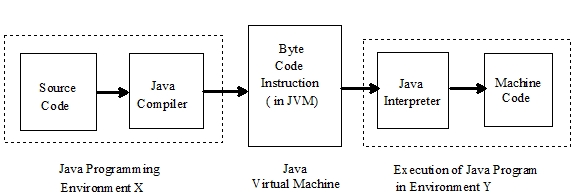
Java has overcome this problem of architecture and environment dependency. Java solves this problem using the concept what is called Java Virtual Machine (JVM). This JVM specifies wonderfully detailed with a dummy CPU and dummy instruction set that looks like standard assembly code. The Java compiler transforms the source programs into the instructions of JVM. The compiled Java code in known as byte code instruction (which are assembly code according to JVM). Next, Java interpreter is there which is specific to each environment (processor and OS) and converts the byte code instructions into the native processor instructions before executing it. Thus, converting a program source into an object code is compile half way and interpret half way. Figure 1.1illustrates this mechanism.

Figure 1.1 : Compilation of Java source code into object code

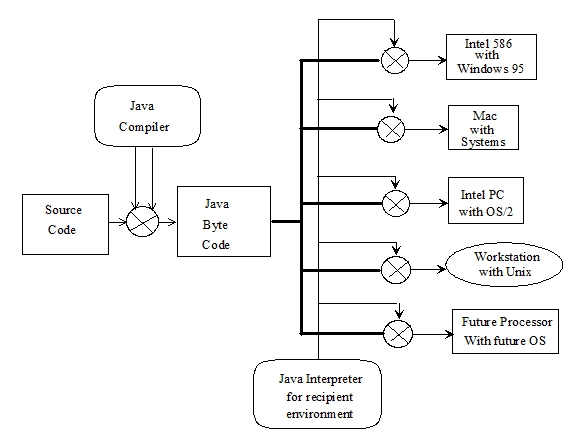
As the Java byte codes are architecture and operating system independent they are highly portable and can be executed on any system without change. This platform independence is illustrated in Figure 1.2

Figure 1.2 :Platform independent Java programming

Using the conventional programming languages like C or Pascal, if we need a slice of memory we have to allocate it and then to returns it to the system we are finished with it, Thus, here memory management is solely decided by the programmer. This overhead is eliminated in Java. Here, a program does not need to be malicious to suck up memory and not release it. Java controls all of the memory, Java�s run time system supports automatic garbage collectors based memory management system. Every once in a while, it will scan through all of the objects in a process to see if any of them are not used. The obsolete objects are reclaimed from the memory. As there no explicit memory manipulation is required by the programmer, so Java programs are highly robust

Multithreading

Another important contribution of Java is the support of multithreading. The multithreading is basically, the ability to run several tasks within the context of one large application. In more simpler version, a program is a list of instructions , and path through list of instructions is often called the thread of execution. In many cases, execution of a program through multiple threads makes more sense. For an example, suppose, a program needs to open a file, draw some thing on the screen, and print out something else. Each of these may require waiting for access to some resource. A multithreaded program can, in effect, start up three different threads of executions for these tasks. If the printing thread is waiting for more paper to be loaded in the printer, then the file thread and drawing thread can continue operating. In Java multithreading interpreter can keep track of all threads and switch among all of them, giving each a fair share of the processor�s attention. For most applications, multithreading improves interactive performance and real time system development. The multithreading encourages Java to interface and support several features of modern operating systems and network protocols.

Security in Java

Java is based on client /sever technology, After the accomplishment of source code into byte code translation, Java programs are in effect down loaded from host machines and then run on one�s client machine. Since Java programs are down loaded from all over the world, some precautions are needed to prevent malafide pieces of code called computer viruses embedded within the programs, causing problems to the recipient system and spreading it around. This therefore demands that distributed applications have to exhibit the highest level of security concerns. A byte code verifier in the Java interpreter looks at the incoming byte codes and verifies whether the compiled code is strictly language compliant, in case it founds illegal code, the run time system rejects the code and refuses to run it; thus trapping all malafide codes. Once the strict verification is over, the application proceeds to run and by this Java impotents security holes if any.

Thank you

Tech Jitendra

Fundamental concepts of OOPS in Swift and how to implement them .

Guided by Bipin Ajay founder of Tech Jitendra ,

Thank you for reading. If you like the article stay tunned and follow me . Hope to see you next time .

For every Object Oriented language three concepts stand out: encapsulation, inheritance, and polymorphism. The concepts are general for programming languages, but strongly associated with Object Oriented Programming. I decided to explore the concepts as they are in Swift/Objective-C and implement them in C.

Some concepts have different forms in programming languages. For each concept I provide short description of what the concepts is.

C

If you’re a C programmer you can skip this part. But it you never touched C code or feel a bit rusty, here’s a quick refresher on language constructions used in example.

C has two files:

  • .h — header file, contains function and data declarations, included by clients code;
  • .c — source code, implementation.

We will work with pointers. Pointer is a typed reference to location in memory. Pointers are declared using asterisk after the type.

int *pointer;

We can create a pointer to anything in memory.

There’s no classes in C, but we have structures.

struct Foo {
int member;
};

Structures can contain only data not functions. But we have pointers to functions.

struct Foo {
int member;
void (*function)(void);
};

Looks familiar if you used blocks in Objective-C.

C requires declaration before use.

struct Foo;
void function(void);

We can create aliases to types for our convenience.

typedef struct Foo *FooRef; // FooRef is now a pointer to Foo
FooRef foo;

We can access members of a structure using dot notation. Accessing pointer value is called dereferencing. For members of a structure we can use -> operator.

*pointer = 123;foo->member = 123;

In C we can allocate and deallocate memory directly, without any memory management mechanism. This is performed using malloc and freefunctions.

FooRef foo = (FooRef)malloc(sizeof(Foo));
free(foo);

In general C is very focused on working with memory and pointers. Some features are implemented by using well defined memory layout.

Encapsulation

Encapsulation is the mechanism to restrict access to certain data, variables or fields. By restricting access to data we prevent unexpected changes. Encapsulation instead exposes functions to operate on that data.

Encapsulation restricts direct access to data and exposes functions to operate on that data.

Here’s an example to demonstrate the concept. Say I’m working on a drawing app and my drawing are represented by the Canvas class. It contains specific information needed to render (such as size, pixel density, color space, etc.), whether the destination is a display, a printer, or a bitmap.

class Canvas {
/// width of the canvas in pixels
private(set) var width: Int

/// height of the canvas in pixels
private(set) var height: Int init() {
width = 320
height = 240
}
}

Swift encapsulates data through properties. In Objective-C, property is a combination of instance variable and synthesized accessor method(s).

@interface Canvas : NSObject@property (nonatomic, readonly) int width;
@property (nonatomic, readonly) int height;@end

In C we use forward declaration for data structure and function in header file and implement them in .c file.

// Canvas.htypedef struct Canvas * CanvasRef;extern int CanvasGetWidth(CanvasRef canvas);
extern int CanvasGetHeight(CanvasRef canvas);extern CanvasRef CanvasCreate(void);
// Canvas.ctypedef struct Canvas {
int width;
int height;
} Canvas;int CanvasGetWidth(CanvasRef canvas) {
return canvas->width;
}int CanvasGetHeight(CanvasRef canvas) {
return canvas->height;
}CanvasRef CanvasCreate(void) {
Canvas *canvas = (Canvas *)malloc(sizeof(Canvas)); canvas->width = 320;
canvas->height = 240; return canvas;
};

All three languages provide encapsulation mechanisms. Naturally, encapsulation in Objective-C is very similar to C. With exception that the compiler will synthesize accessor methods for properties at compile time.

Encapsulation mechanism in Swift and Objective-C is weaker than C. This is general problem with any Object Oriented Language. What makes it weaker is necessary relationship between objects. Sometimes we need our inherited objects have access to parent data. This leads to a complex mix of access modifiers.

For Objective-C most concerning is dynamic nature of the language, partially inherited by Swift. Key-Value Coding, for instance, opens encapsulated data to unexpected access without any compiler protection.

Encapsulation in C is most strict. Everything is hidden in .c file, there is no way to access encapsulated data from the outside.

Inheritance

Inheritance allows creating new objects based on existing, inheriting properties and behaviour.

Swift and Objective-C provide inheritance mechanisms. Usually we use inheritance to extend existing type for a specific case, specialize more generic type. In example DisplayCanvas extends Canvas to provide color profile information.

/// The canvas when rendering destination is a display
class DisplayCanvas: Canvas {
/// The color profile of a display
enum ColorSpace {
/// Standard RGB color space
case sRGB
/// Wide gamut RGB (DCI-P3) color space
case wideGamutRGB
} private(set) var colorSpace: ColorSpace override init() {
colorSpace = .wideGamutRGB
super.init()
}
}

In C we can use composition to simulate inheritance.

// Canvas.htypedef enum ColorSpace {
sRGB = 0,
wideGamutRGB
} ColorSpace;extern CanvasRef DisplayCanvasCreate(void);
// Canvas.mtypedef struct DisplayCanvas {
Canvas super;
ColorSpace colorSpace;
} DisplayCanvas;CanvasRef DisplayCanvasCreate(void) {
DisplayCanvas *canvas
= (DisplayCanvas *)malloc(sizeof(DisplayCanvas)); canvas->super.width = 320;
canvas->super.height = 240;
canvas->colorSpace = wideGamutRGB; return (CanvasRef)canvas;
};

Inheritance in Swift and Objective-C not only allows using existing objects to create new, it is also subtyping mechanism. Subtyping allows using inherited type where the base type can be used, substitute the base type. In 1994 computer scientists Barbara Liskov and Jeannette Wing formulated Liskov Substitution Principle:

Subtype Requirement: Let ϕ(x) be a property provable about objects x of type T. Then ϕ(y) should be true for objects y of type S where S is a subtype of T.

Barbara Liskov and Jeannette Wing

Inheritance allows creating new objects based on existing, inheriting properties and behaviour. We must be able to use the new object where the base object can be used.

For our example we must be able to use DisplayCanvas wherever we can use Canvas.

/// Draws canvas to a destination
func draw(_ canvas: Canvas) {
print("width: \(canvas.width), height: \(canvas.height)")
}let canvas = DisplayCanvas()
draw(canvas)width: 320, height: 240

Same works in C.

// Canvas.hextern void CanvasDraw(CanvasRef canvas);
// Canvas.mvoid CanvasDraw(CanvasRef canvas) {
printf("width: %d, height: %d\n",
canvas->width, canvas->height);
}
// main.cCanvasRef canvas = DisplayCanvasCreate();
CanvasDraw(canvas);width: 320, height: 240

Because of the way C aligns structures in memory, we can cast pointers from one to the other if first elements are the same. If we would change order of members in our structure cast will not work.

typedef struct DisplayCanvas {
ColorSpace colorSpace;
Canvas super;
} DisplayCanvas; // We can not safely cast DisplayCanvas to Canvas

Another approach to inheritance would be using union and enum in base structure to identify the type.

typedef struct DisplayCanvas {
ColorSpace colorSpace;
} DisplayCanvas;typedef struct PrintCanvas {
int dpi;
} PrintCanvas;typedef enum CanvasType {
display = 0,
print
} CanvasType;typedef struct Canvas {
union {
DisplayCanvas display;
PrintCanvas printer;
} super;

CanvasType type;
} Canvas;

This way we can simulate type(of:) and isMemberOfClass: checks.

Thanking You

Tech Jitendra .

Generics in Java

Guided by Bipin Ajay
Founder of Tech Jitendra .

Generics in Java is similar to templates in C++. The idea is to allow type (Integer, String, … etc and user defined types) to be a parameter to methods, classes and interfaces. For example, classes like HashSet, ArrayList, HashMap, etc use generics very well. We can use them for any type.Generic Class
Like C++, we use <> to specify parameter types in generic class creation. To create objects of generic class, we use following syntax.

// To create an instance of generic class BaseType <Type> obj = new BaseType <Type>() Note: In Parameter type we can not use primitives like ‘int’,’char’ or ‘double’.// A Simple Java program to show working of user defined // Generic classes // We use < > to specify Parameter type classTest<T> { // An object of type T is declared T obj; Test(T obj) {  this.obj = obj;  }  // constructor publicT getObject()  { returnthis.obj; } } // Driver class to test above classMain { publicstaticvoidmain (String[] args) { // instance of Integer type Test <Integer> iObj = newTest<Integer>(15); System.out.println(iObj.getObject()); // instance of String type Test <String> sObj = newTest<String>("GeeksForGeeks"); System.out.println(sObj.getObject()); } }output 15 Geek for Geek

Thanking you

Tech Jitendra

Java – String Class and its methods explained with examples

Guided by Bipin Ajay
Founder of Tech Jitendra .

String is a sequence of characters, for e.g. “Hello” is a string of 5 characters. In java, string is an immutable object which means it is constant and can cannot be changed once it has been created. In this tutorial we will learn about String class and String methods in detail along with many other Java String tutorials.

Creating a String

There are two ways to create a String in Java

  1. String literal
  2. Using new keyword

String literal

In java, Strings can be created like this: Assigning a String literal to a String instance:String str1 = “Welcome”; String str2 = “Welcome”;

The problem with this approach: As I stated in the beginning that String is an object in Java. However we have not created any string object using new keyword above. The compiler does that task for us it creates a string object having the string literal (that we have provided , in this case it is “Welcome”) and assigns it to the provided string instances.

But if the object already exist in the memory it does not create a new Object rather it assigns the same old object to the new instance, that means even though we have two string instances above(str1 and str2) compiler only created on string object (having the value “Welcome”) and assigned the same to both the instances. For example there are 10 string instances that have same value, it means that in memory there is only one object having the value and all the 10 string instances would be pointing to the same object.

What if we want to have two different object with the same string? For that we would need to create strings using new keyword.

Using New Keyword

As we saw above that when we tried to assign the same string object to two different literals, compiler only created one object and made both of the literals to point the same object. To overcome that approach we can create strings like this:String str1 = new String(“Welcome”); String str2 = new String(“Welcome”);

In this case compiler would create two different object in memory having the same string.

A Simple Java String Example

public class Example{ public static void main(String args[]){ //creating a string by java string literal String str = “Beginnersbook”; char arrch[]={‘h’,’e’,’l’,’l’,’o’}; //converting char array arrch[] to string str2 String str2 = new String(arrch); //creating another java string str3 by using new keyword String str3 = new String(“Java String Example”); //Displaying all the three strings System.out.println(str); System.out.println(str2); System.out.println(str3); } }

Output:Beginnersbook hello Java String Example

Thaking you

Tech Jitendra

Java Swing Tutorial

Java Swing Tutorial

Guided by Bipin Ajay , founder of Tech Jitendra .

Java Swing tutorial is a part of Java Foundation Classes (JFC) that is used to create window-based applications. It is built on the top of AWT (Abstract Windowing Toolkit) API and entirely written in java.

Unlike AWT, Java Swing provides platform-independent and lightweight components.

The javax.swing package provides classes for java swing API such as JButton, JTextField, JTextArea, JRadioButton, JCheckbox, JMenu, JColorChooser etc.


Difference between AWT and Swing

There are many differences between java awt and swing that are given below.No.Java AWTJava Swing1)AWT components are platform-dependent.Java swing components are platform-independent.2)AWT components are heavyweight.Swing components are lightweight.3)AWT doesn’t support pluggable look and feel.Swing supports pluggable look and feel.4)AWT provides less components than Swing.Swing provides more powerful componentssuch as tables, lists, scrollpanes, colorchooser, tabbedpane etc.5)AWT doesn’t follows MVC(Model View Controller) where model represents data, view represents presentation and controller acts as an interface between model and view.Swing follows MVC.

What is JFC

The Java Foundation Classes (JFC) are a set of GUI components which simplify the development of desktop applications.

Thanking you

Tech Jitendra

Design a site like this with WordPress.com
Get started