Web Design –

Web Design

It is a very helpful article for IT aspirant. This article is guided by Bipin Ajay , adim of Tech Jitendra .

Web design is the process of creating websites. It encompasses several different aspects, including webpagelayout, content production, and graphic design. While the terms web design and web development are often used interchangeably, web design is technically a subset of the broader category of web development.

Websites are created using a markup language called HTML. Web designers build webpages using HTML tags that define the content and metadata of each page. The layout and appearance of the elements within a webpage are typically defined using CSS, or cascading style sheets. Therefore, most websites include a combination of HTML and CSS that defines how each page will appear in a browser.

Some web designers prefer to hand code pages (typing HTML and CSS from scratch), while others use a “WYSIWYG” editor like Adobe Dreamweaver. This type of editor provides a visual interface for designing the webpage layout and the software automatically generates the corresponding HTML and CSS code. Another popular way to design websites is with a content management system like WordPress or Joomla. These services provide different website templates that can be used as a starting point for a new website. Webmasterscan then add content and customize the layout using a web-based interface.

While HTML and CSS are used to design the look and feel of a website, images must be created separately. Therefore, graphic design may overlap with web design, since graphic designers often create images for use on the Web. Some graphics programs like Adobe Photoshop even include a “Save for Web…” option that provides an easy way to export images in a format optimized for web publishing.

Tech Jitendra

Visit again Thank you .

Software Engineering Code of Ethics and Professional

Software Engineering Code of Ethics and Professional Practice

This is very helpful article for IT aspirant .

Guided by Bipin Ajay , admin of Tech Jitendra

Software engineers shall commit themselves to making the analysis, specification, design, development, testing and maintenance of software a beneficial and respected profession. In accordance with their commitment to the health, safety and welfare of the public, software engineers shall adhere to the following Eight Principles:

1. PUBLIC – Software engineers shall act consistently with the public interest.

2. CLIENT AND EMPLOYER – Software engineers shall act in a manner that is in the best interests of their client and employer consistent with the public interest.

3. PRODUCT – Software engineers shall ensure that their products and related modifications meet the highest professional standards possible.

4. JUDGMENT – Software engineers shall maintain integrity and independence in their professional judgment.

5. MANAGEMENT – Software engineering managers and leaders shall subscribe to and promote an ethical approach to the management of software development and maintenance.

6. PROFESSION – Software engineers shall advance the integrity and reputation of the profession consistent with the public interest.

7. COLLEAGUES – Software engineers shall be fair to and supportive of their colleagues.

8. SELF – Software engineers shall participate in lifelong learning regarding the practice of their profession and shall promote an ethical approach to the practice of the profession.

Thanking you

Tech Jitendra

ASP.NET

It is a very helpful article for IT sectors beginners ; guided by bipin ajay founder of Tech Jitendra

ASP.NET

It is a web framework designed and developed by Microsoft. It is used to develop websites, web applications and web services. It provides fantastic integration of HTML, CSS and JavaScript. It was first released in January 2002. It is built on the Common Language Runtime (CLR) and allows programmers to write code using any supported .NET language.

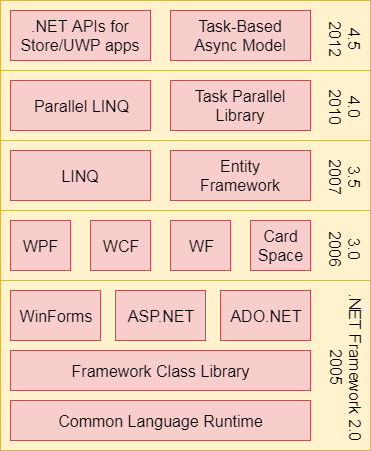
ASP.NET is a part of Microsoft .NET Framework. The following image shows the component stack.

ASP Net 1

Thanking You

Tech Jitendra

MULTITHREADING IN JAVA

This is a very helpful article for IT apriants .

Multithreading in Java
Multithreading is a Java feature that allows concurrent execution of two or more parts of a program for maximum utilization of CPU. Each part of such program is called a thread. So, threads are light-weight processes within a process.
The main purpose of multithreading is to provide simultaneous execution of two or more parts of a program to maximum utilize the CPU time. A multithreaded program contains two or more parts that can run concurrently. Each such part of a program called thread.
Basically multithreading is useful to develop an application in multi programming environment where a single program can do many thing simultaneously .
Threads can be created by using two mechanisms :

  1. Extending the Thread class
  2. Implementing the Runnable Interface

Thread creation by extending the Thread class

We create a class that extends the java.lang.Thread class. This class overrides the run() method available in the Thread class. A thread begins its life inside run() method. We create an object of our new class and call start() method to start the execution of a thread. Start() invokes the run() method on the Thread object.

example

class First extends Thread
{
public void run()
{
for(int i=1;i<=100;i++)
System.out.print(” value of i= “+i);
System.out.println(” \nExit from thread first”);

}
}

class Second extends Thread
{
public void run()
{
for(int j=1;j<=100;j++)
System.out.print(” value of j= “+j);
System.out.println(“\n Exit from thread Second”);

}
}

class Third extends Thread
{ int k;
public void run()
{
for(k=1;k<=100;k++)
System.out.print(” value of k= “+k);
System.out.println(“\n Exit from thread Third”);

}
}

class Test
{
public static void main(String args[])
{
First f1=new First();
Second s1=new Second();
Third t1= new Third();
f1.start();
s1.start();
t1.start();
}
}

Thread creation by implementing the Runnable Interface

We create a new class which implements java.lang.Runnable interface and override run() method. Then we instantiate a Thread object and call start() method on this object.
EG.
Class className impliments Runnable
{
Public void Run()
{

}
}

Thanking You

Tech Jitendra

Applet life cycle in Java

This is very helpful article for IT industry.

Guided by Ajay

Applet API support methods and 3rd page given Applet Example.

Various states, an applet, undergoes between its object creation and object removal (when the job is over) is known as Applet Life Cycle. Each state is represented by a method. There exists 5 states represented by 5 methods. That is, in its life of execution, the applet exists (lives) in one of these 5 states.

These methods are known as “callback methods” as they are called automatically by the browser whenever required for the smooth execution of the applet. Programmer just write the methods with some code but never calls.

Following are the methods.

  1. init() method
  2. start() method
  3. paint() method
  4. stop() method
  5. destroy() method

These methods are known as Applet Life Cycle methods. These methods are defined in java.applet.Applet class except paint()method. The paint() method is defined in java.awt.Component class, an indirect super class of Applet.

Browser Responsibilities

The Applet Life Cycle methods are called as callback methods as they are called implicitly by the browser for the smooth execution of the applet. Browser should provide an environment known as container for the execution of the applet. Following are the responsibilities of the browser.

  1. It should call the callback methods at appropriate times for the smooth execution of the applet.
  2. It is responsible to maintain the Applet Life Cycle.
  3. It should have the capability to communicate between applets, applet to JavaScript and HTML, applet to browser etc.

Description of Applet Life Cycle methods

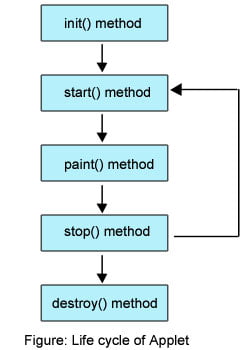
Even though, the methods are called automatically by the browser, the programmer should know well when they are called and what he can do with the methods. Following is the schematic representation of the methods.


Brief Description of Life Cycle Methods

Following is the brief description of the above methods.

  1. init(): The applet’s voyage starts here. In this method, the applet object is created by the browser. Because this method is called before all the other methods, programmer can utilize this method to instantiate objects, initialize variables, setting background and foreground colors in GUI etc.; the place of a constructor in an application. It is equivalent to born state of a thread.
  2. start(): In init() method, even through applet object is created, it is in inactivestate. An inactive applet is not eligible for microprocessor time even though the microprocessor is idle. To make the applet active, the init() method calls start() method. In start() method, applet becomes active and thereby eligible for processor time.
  3. paint(): This method takes a java.awt.Graphics object as parameter. This class includes many methods of drawing necessary to draw on the applet window. This is the place where the programmer can write his code of what he expects from applet like animation etc. This is equivalent to runnable stateof thread.
  4. stop(): In this method the applet becomes temporarily inactive. An applet can come any number of times into this method in its life cycle and can go back to the active state (paint() method) whenever would like. It is the best place to have cleanup code. It is equivalent to the blocked state of the thread.
  5. destroy(): This method is called just before an applet object is garbage collected. This is the end of the life cycle of applet. It is the best place to have cleanup code. It is equivalent to the dead state of the thread.

After knowing the methods, let us know when they are called by the browser.

  • init() method is called at the time of starting the execution. This is called only once in the life cycle.
  • start() method is called by the init() method. This method is called a number of times in the life cycle; whenever the applet is deiconifed , to make the applet active.
  • paint() method is called by the start() method. This is called number of times in the execution.
  • stop() method is called whenever the applet window is iconified to inactivate the applet. This method is called number of times in the execution.
  • destroy() method is called when the applet is closed. This method is called only once in the life cycle.

Observe, the init() and destroy() methods are called only once in the life cycle. But, start(), paint() and stop() methods are called a number of times

Thank you

Tech Jitendra .

JAVA KEYWORDS

This is very helpful article for IT aspirants .

Guided by Bipin Ajay

Java Keywords

Table 1. Java Keywords

abstract

assert

boolean

break

byte

case

catch

char

class

const

continue

default

do

double

else

enum

extends

final

finally

float

for

goto

if

implements

import

instanceof

int

interface

long

native

new

package

private

protected

public

return

short

static

strictfp

super

switch

synchronized

this

throw

throws

transient

try

void

volatile

while

Keywords goto and const are reserved, but never used.

Keyword strictfp was added in Java 1.2.

Keyword assert was added in Java 1.4.

Keyword enum was added in Java 1.5.

In addition to these 50 keywords, Java also defined three special literals: truefalse, and null.

Keywords in our HelloWorld program are in bold:

public class HelloWorld {
public static void main(String[] args) {
System.out.println("Hello World!");
}
}

Visit Again … Thnk You ..

Tech Jitendra

A JAVA PROGRAM

Java Fundamentals Tutorial: Hello World

This is very helpful article for IT aspirant

Guided by Bipin Ajay


2. A Java Hello World Program

Implementing Hello World in Java

2.1. HelloWorld.java

public class HelloWorld {
public static void main(String[] args) {
System.out.println("Hello World!");
}
}
  • All code is contained within a class, in this case HelloWorld.
  • The file name must match the class name and have a .java extension, for example: HelloWorld.java
  • All executable statements are contained within a method, in this case named main().
  • Use System.out.println() to print text to the terminal.

Classes and methods (including other flow-control structures) are always defined in blocks of code enclosed by curly braces ({ }).

All other statements are terminated with a semi-colon (;).

Java language is case-sensitive! This means that HelloWorld is not the same as helloworld, nor is String the same as string.

There is an generally accepted naming convention in the Java community to capitalize the names of Java classes and use the so-called CamelCase (or CamelHump) notation, where the first letter of each word is capitalized, but the words are joined together (i.e. no dashes or underscores).

[Note]

Note

Java source files can be encoded in UTF-8 to support internationalized characters (even for class, method, and variable names). In most situations however, Java sources are stored in US-ASCII character set, and internationalized strings are loaded from external resource files.

Thank you

Tech Jitendra

EDITIONS OF JAVA ???

This is very helpful article for IT Aspirant

This article is guided by Bipin Ajay .

Java is a high-level, general-purpose, object-oriented, and secure programming language developed by James Gosling at Sun Microsystems, Inc. in 1991. It is formally known as OAK. In 1995, Sun Microsystem changed the name to Java. In 2009, Sun Microsystem takeover by Oracle Corporation.

Editions of Java

Each edition of Java has different capabilities. There are three editions of Java:

  • Java Standard Editions (JSE): It is used to create programs for a desktop computer.
  • Java Enterprise Edition (JEE): It is used to create large programs that run on the server and manages heavy traffic and complex transactions.
  • Java Micro Edition (JME): It is used to develop applications for small devices such as set-top boxes, phone, and appliances.

Thanking you

Tech Jitendra

WHY JAVA ??

Java Fundamentals Tutorial

This is a very helpful article for IT aspirant , guided by Bipin Ajay


Why Java?

  • Object oriented
  • Interpreted
  • Portable
  • Simple yet feature-full
  • Secure and robust
  • Scalable
  • High-performance multi-threaded
  • Dynamic
  • Distributed

Object OrientedEverything in Java is coded using OO principles. This facilitates code modularization, reusability, testability, and performance.Interpreted/PortableJava source is complied into platform-independent bytecode, which is then interpreted (compiled into native-code) at runtime. Java’s slogan is “Write Once, Run Everywhere”SimpleJava has a familiar syntax, automatic memory management, exception handling, single inheritance, standardized documentation, and a very rich set of libraries (no need to reinvent the wheel).Secure/RobustDue to its support for strong type checking, exception handling, and memory management, Java is immune to buffer- overruns, leaked memory, illegal data access. Additionally, Java comes with a Security Manager that provides a sand-box execution model.ScalableThanks to its overall design, Java is scalable both in terms of performance/throughput, and as a development environment. A single user can play a Java game on a mobile phone, or millions of users can shop though a Java-based e-commerce enterprise application.High-performance/Multi-threadedWith its HotSpot Just-in-Time compiler, Java can achieve (or exceed) performance of native applications. Java supports multi-threaded development out-of-the-box.DynamicJava can load application components at run-time even if it knows nothing about them. Each class has a run-time representation.DistributedJava comes with support for networking, as well as for invoking methods on remote (distributed) objects through RMI.

Thank you

Tech Jitendra

WHAT IS JAVA ??

IT is very helpful article for IT aspirant. Guided by Bipin Ajay

What is Java?

Java Technology consists of:

  • Java Language
  • Java Platform
  • Java Tools

Figure 1. Java technology

images/JDK.png

Java language is a general-purpose programming language. It can be used to develop software for mobile devices, browser-run applets, games, as well as desktop, enterprise (server-side), and scientific applications.

Java platform consists of Java virtual machine (JVM) responsible for hardware abstraction, and a set of libraries that gives Java a rich foundation.

Java tools include the Java compiler as well as various other helper applications that are used for day-to-day development (e.g. debugger).

Thanks

Tech Jitendra

Design a site like this with WordPress.com
Get started