
Guided by Bipin Ajay , Founder of Tech Jitendra .
An exception (or exceptional event) is a problem that arises during the execution of a program. When an Exception occurs the normal flow of the program is disrupted and the program/Application terminates abnormally, which is not recommended, therefore, these exceptions are to be handled.
An exception can occur for many different reasons. Following are some scenarios where an exception occurs.
- A user has entered an invalid data.
- A file that needs to be opened cannot be found.
- A network connection has been lost in the middle of communications or the JVM has run out of memory.
Some of these exceptions are caused by user error, others by programmer error, and others by physical resources that have failed in some manner.
Based on these, we have three categories of Exceptions. You need to understand them to know how exception handling works in Java.
- Checked exceptions − A checked exception is an exception that is checked (notified) by the compiler at compilation-time, these are also called as compile time exceptions. These exceptions cannot simply be ignored, the programmer should take care of (handle) these exceptions.
For example, if you use FileReader class in your program to read data from a file, if the file specified in its constructor doesn’t exist, then a FileNotFoundException occurs, and the compiler prompts the programmer to handle the exception.
Example
Live Demoimport java.io.File; import java.io.FileReader; public class FilenotFound_Demo { public static void main(String args[]) { File file = new File(“E://file.txt”); FileReader fr = new FileReader(file); } }
If you try to compile the above program, you will get the following exceptions.
Output
C:\>javac FilenotFound_Demo.java FilenotFound_Demo.java:8: error: unreported exception FileNotFoundException; must be caught or declared to be thrown FileReader fr = new FileReader(file); ^ 1 error
Note − Since the methods read() and close() of FileReader class throws IOException, you can observe that the compiler notifies to handle IOException, along with FileNotFoundException.
- Unchecked exceptions − An unchecked exception is an exception that occurs at the time of execution. These are also called as Runtime Exceptions. These include programming bugs, such as logic errors or improper use of an API. Runtime exceptions are ignored at the time of compilation.
For example, if you have declared an array of size 5 in your program, and trying to call the 6th element of the array then an ArrayIndexOutOfBoundsExceptionexceptionoccurs.
Example
Live Demopublic class Unchecked_Demo { public static void main(String args[]) { int num[] = {1, 2, 3, 4}; System.out.println(num[5]); } }
If you compile and execute the above program, you will get the following exception.
Output
Exception in thread “main” java.lang.ArrayIndexOutOfBoundsException: 5 at Exceptions.Unchecked_Demo.main(Unchecked_Demo.java:8)
- Errors − These are not exceptions at all, but problems that arise beyond the control of the user or the programmer. Errors are typically ignored in your code because you can rarely do anything about an error. For example, if a stack overflow occurs, an error will arise. They are also ignored at the time of compilation.
Exception Hierarchy
All exception classes are subtypes of the java.lang.Exception class. The exception class is a subclass of the Throwable class. Other than the exception class there is another subclass called Error which is derived from the Throwable class.
Errors are abnormal conditions that happen in case of severe failures, these are not handled by the Java programs. Errors are generated to indicate errors generated by the runtime environment. Example: JVM is out of memory. Normally, programs cannot recover from errors.
The Exception class has two main subclasses: IOException class and RuntimeException Class.
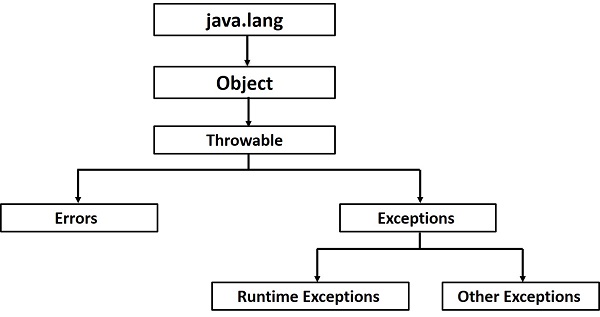
Following is a list of most common checked and unchecked Java’s Built-in Exceptions.
Exceptions Methods
Following is the list of important methods available in the Throwable class.Sr.No.Method & Description1
public String getMessage()
Returns a detailed message about the exception that has occurred. This message is initialized in the Throwable constructor.2
public Throwable getCause()
Returns the cause of the exception as represented by a Throwable object.3
public String toString()
Returns the name of the class concatenated with the result of getMessage().4
public void printStackTrace()
Prints the result of toString() along with the stack trace to System.err, the error output stream.5
public StackTraceElement [] getStackTrace()
Returns an array containing each element on the stack trace. The element at index 0 represents the top of the call stack, and the last element in the array represents the method at the bottom of the call stack.6
public Throwable fillInStackTrace()
Fills the stack trace of this Throwable object with the current stack trace, adding to any previous information in the stack trace.
Catching Exceptions
A method catches an exception using a combination of the try and catch keywords. A try/catch block is placed around the code that might generate an exception. Code within a try/catch block is referred to as protected code, and the syntax for using try/catch looks like the following −
Syntax
try { // Protected code } catch (ExceptionName e1) { // Catch block }
The code which is prone to exceptions is placed in the try block. When an exception occurs, that exception occurred is handled by catch block associated with it. Every try block should be immediately followed either by a catch block or finally block.
A catch statement involves declaring the type of exception you are trying to catch. If an exception occurs in protected code, the catch block (or blocks) that follows the try is checked. If the type of exception that occurred is listed in a catch block, the exception is passed to the catch block much as an argument is passed into a method parameter.
Example
The following is an array declared with 2 elements. Then the code tries to access the 3rd element of the array which throws an exception.Live Demo// File Name : ExcepTest.java import java.io.*; public class ExcepTest { public static void main(String args[]) { try { int a[] = new int[2]; System.out.println(“Access element three :” + a[3]); } catch (ArrayIndexOutOfBoundsException e) { System.out.println(“Exception thrown :” + e); } System.out.println(“Out of the block”); } }
This will produce the following result −
Output
Exception thrown :java.lang.ArrayIndexOutOfBoundsException: 3 Out of the block
Thanking you
Tech Jitendra
 Tech Jitendra